Series Cloud-to-OnPrem Kubernetes Migration
Author: Zohair Diab | DevOps Engineer | K8s Migration Lab
Overview
This series documents the full journey of migrating production-grade Kubernetes clusters from DigitalOcean to on-premise infrastructure.
The Goal: Deliver a validated, cost-efficient, and operationally resilient Kubernetes architecture — backed by FinOps principles (CAPEX vs OPEX justification) and real, hands-on implementation.
Every decision here — from OS to backup tool — is tested, reasoned, and repeatable. You can treat this series as a cookbook for building your own on-prem HA cluster.
The Big Picture
Migrating from a managed cloud (DigitalOcean) to on-prem is not just a lift-and-shift — it’s a strategic redesign. You’re replacing vendor-managed automation with your own operational control.
That means carefully choosing:
- A reliable virtualization layer — the foundation for all compute
- A secure, scalable network backbone — zero-trust ready from day one
- A resilient storage layer — because data loss is not an option
- A backup and recovery process that actually works — tested, not assumed
This blueprint walks through those four pillars in detail, with real configurations you can adapt to your own environment.
1. Cluster Architecture
The choice of Proxmox VE was driven not only by business requirements, but also by its flexibility and strong feature set:
- Golden Image Principle: Consistent VM deployment through templates
- Native High Availability: VMs migrate seamlessly between nodes without downtime
- Efficient Lifecycle Management: Templating and snapshots for scalable operations
- Cost Efficiency: Open-source with enterprise support options when needed
Design Summary
| Component | Details |
|---|---|
| Operating System | Talos Linux (v1.11.0) — immutable, API-driven, security-first |
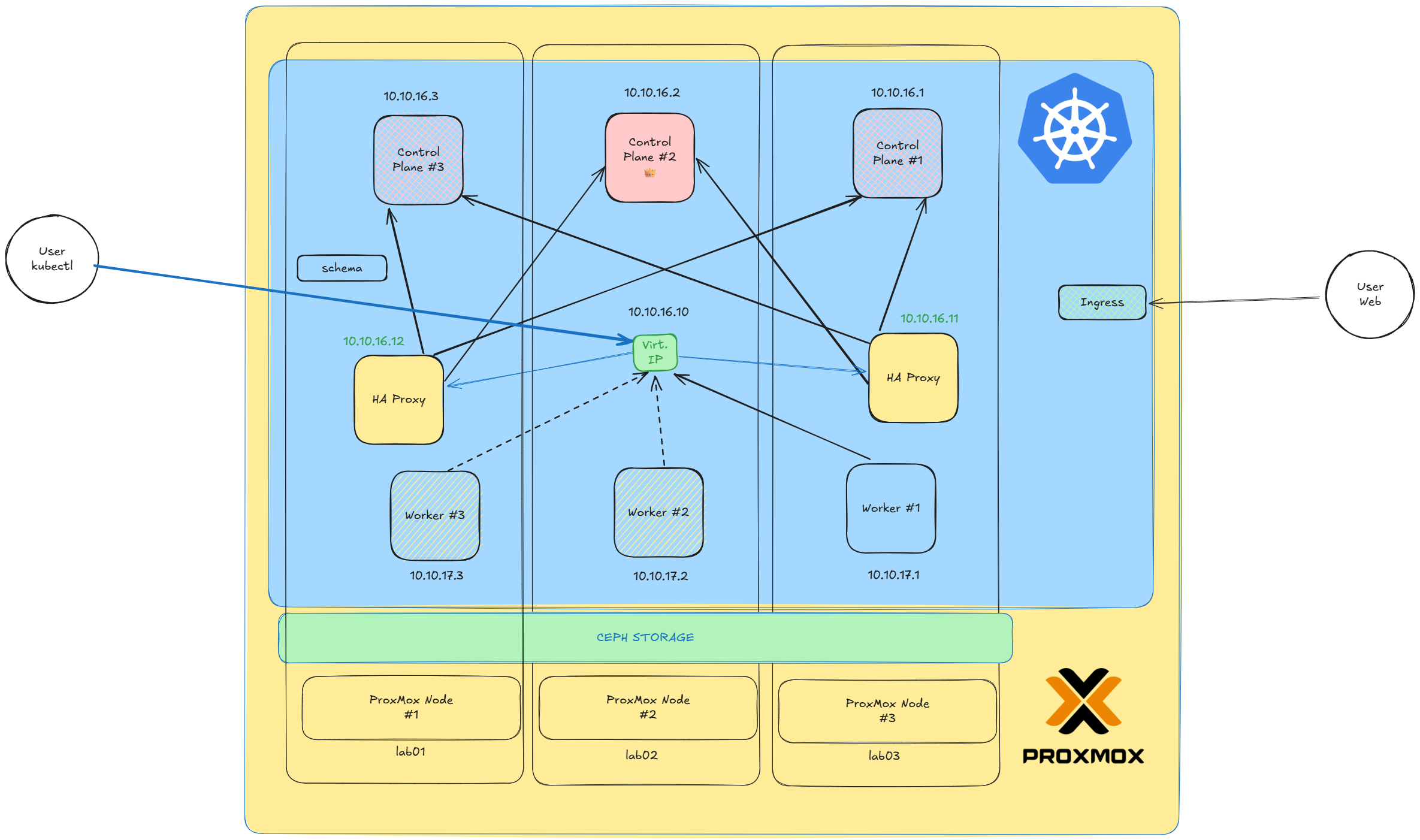
| Control Plane | 3 nodes (etcd quorum for HA) |
| Load Balancer | 2 HAProxy nodes (active/passive with Keepalived) |
| Worker Nodes | 3 nodes (horizontally scalable) |
| Total VMs | 8 virtual machines + 1 Virtual IP |
Talos OS — The Kubernetes-First Operating System
Talos OS is a minimal, immutable, and API-managed operating system purpose-built for Kubernetes nodes. It removes traditional Linux management interfaces, such as SSH and shell access, to enforce security and consistency.
Why Talos over traditional Linux? No SSH means no attack vector. No package manager means no drift. Every node is identical, every time. This is infrastructure-as-code taken to its logical conclusion.
Key Advantages
- Immutable Design: Every node runs an identical, tamper-proof configuration
- API-Driven Configuration: Managed entirely through APIs, enabling GitOps workflows
- Minimal Attack Surface: No interactive shells, no package managers, no surprises
- Atomic Upgrades: Automatic OS upgrades with instant rollback capability
- Native Kubernetes Integration: Simplified provisioning and lifecycle management
Talos OS eliminates the operational noise of traditional systems administration, allowing DevOps teams to focus solely on cluster management and automation.
Cluster Inventory
| Role | IP Address | Operating System | RAM | vCPU |
|---|---|---|---|---|
| cn-1 | 10.10.16.1 | Talos v1.11.0 | 11.77 GiB | 4 |
| cn-2 | 10.10.16.2 | Talos v1.11.0 | 11.77 GiB | 4 |
| cn-3 | 10.10.16.3 | Talos v1.11.0 | 11.77 GiB | 4 |
| Virtual IP | 10.10.16.11 | — | — | — |
| ha-1 | 10.10.16.12 | Arch Linux 6.15.8 | 4.93 GiB | 2 |
| ha-2 | 10.10.16.13 | Arch Linux 6.15.8 | 4.93 GiB | 2 |
| worker-1 | 10.10.17.1 | Talos v1.11.0 | 11.77 GiB | 2 |
| worker-2 | 10.10.17.2 | Talos v1.11.0 | 11.77 GiB | 2 |
| worker-3 | 10.10.17.3 | Talos v1.11.0 | 11.77 GiB | 2 |
MetalLB Load Balancer Range: 198.51.100.50 - 198.51.100.99
Note: This IP range is an example. Replace with your own routable range for production deployments.
2. Networking for HA & Secure Clusters
Network architecture is the backbone of any Kubernetes deployment. For on-prem, you need components that work without cloud-provider magic — and that means choosing tools designed for bare-metal environments.
| Component | Choice | Rationale |
|---|---|---|
| CNI | Cilium (on Talos) | eBPF-powered networking for superior performance, observability, and security policies |
| Load Balancer | MetalLB | Bare-metal friendly, simple IP pool management with L2/BGP modes |
| Ingress Controller | Traefik | Lightweight, automatic HTTPS via Let’s Encrypt, clean routing rules |
Security Note: Cilium’s eBPF-based network policies provide kernel-level enforcement without the overhead of iptables. Combined with Talos’s immutable OS, this creates a defense-in-depth posture from the infrastructure layer up.
This combination delivers strong security isolation, flexible routing, and future-ready eBPF networking. Cilium also provides built-in Hubble observability, giving you deep visibility into all network flows without additional tooling.
3. Storage Strategy
Storage is where many on-prem Kubernetes deployments struggle. Cloud providers abstract this away, but on bare metal, you need to make deliberate choices.
Rook-Ceph gives you real shared storage (CephFS), database-grade block (RBD), and S3-compatible buckets (RGW) in one unified stack. In contrast, Longhorn focuses on simple replicated block storage and achieves RWX by exporting NFS — which isn’t the same as a true distributed filesystem for I/O-intensive applications.
| Backend | Rationale |
|---|---|
| Ceph (via Rook) | Scalable, fault-tolerant, supports block/file/object storage with built-in replication and encryption |
Why Rook-Ceph for Production?
- Unified Storage: Block (RBD), File (CephFS), and Object (RGW) from a single platform
- Self-Healing: Automatic data rebalancing when nodes fail or are added
- Encryption at Rest: Native support for dm-crypt encrypted OSDs
- Kubernetes-Native: Rook operator handles all lifecycle management
For smaller clusters or simpler use cases, Longhorn remains a solid choice — but for production flexibility and scale, Rook-Ceph is the clear winner.
4. Backup Strategy
Backups are your last line of defense. CSI snapshots are fine for quick rollbacks on the same cluster, but they don’t help when the storage class is gone, the cluster is dead, or you need to migrate to different infrastructure.
Velero + Kopia gives you fast, portable, encrypted backups of both Kubernetes state (manifests, PV data, hooks) with deduplication and encryption built in.
| Tool | Rationale |
|---|---|
| Velero + Kopia | Cluster-wide backup including PVs, CRDs, and namespace-scoped resources |
Why Kopia over Restic? Kopia handles large directory trees faster, keeps repository maintenance sane with automatic cleanup, and restores don’t crawl when you’re under pressure. When your cluster is down at 2 AM, restore speed matters.
This Setup Provides:
- Incremental Backups: Only changed blocks are transferred after initial backup
- Encrypted Storage: AES-256 encryption before data leaves the cluster
- Flexible Restoration: Full cluster, namespace-level, or individual resource recovery
- Cross-Cluster Migration: Restore to any compatible Kubernetes cluster
- Scheduled Automation: Cron-based backup schedules with retention policies
What’s Next?
This blueprint provides the foundation for your on-prem Kubernetes journey. In upcoming posts in this series, we’ll dive deeper into:
- Part 2: Step-by-step Talos cluster bootstrapping with configuration examples
- Part 3: Cilium deep-dive — network policies, Hubble observability, and eBPF magic
- Part 4: Rook-Ceph deployment and storage class configuration
- Part 5: Velero backup automation and disaster recovery testing
- Part 6: FinOps analysis — real cost comparison of cloud vs on-prem
 Stay Updated: Subscribe to the newsletter to get notified when new parts are published. Have questions? Drop them in the comments below or reach out on LinkedIn.
This series is part of the K8s Migration Lab — documenting real-world infrastructure decisions with battle-tested configurations. Built by engineers, for engineers.