Talos Linux is immutable, API-driven, and purpose-built for Kubernetes — but it ships with no built-in load balancer. The moment you try to access your cluster from outside the node network, you hit a wall. In this post we cover the architecture behind using HAProxy on Alpine Linux as a lightweight TCP load balancer for a Talos Kubernetes cluster — why Alpine, why HAProxy, exactly how the traffic flows, and a complete production-ready implementation from VM creation to verified end-to-end connectivity.
Why Talos Needs an External Load Balancer
Talos Linux is not a general-purpose OS. There is no SSH, no shell, no package manager, and no way to install additional software on the node. The Kubernetes API server runs on your control plane node at :6443, and the Talos API runs at :50000 — but both are bound to the node's IP address. If your kubeconfig points to a single control plane node's IP and that node goes down, kubectl is dead. If you add a second control plane node later, there is no virtual IP or built-in load balancing to distribute API requests across them.
For Ingress traffic, the same problem exists at a different layer. Traefik (or any Ingress controller) exposes HTTP/HTTPS via NodePort services — typically :30080 and :30443. But pointing your DNS or browser at a single node's IP means that one node is a single point of failure for all external traffic. You need something in front of the cluster that distributes traffic and provides a single stable entry point.
The Core Requirement
One IP address. Four services. Zero dependencies on the cluster itself. The load balancer must sit outside the Kubernetes cluster and handle: Kubernetes API (:6443), Talos API (:50000), Ingress HTTP (:80 → NodePort :30080), and Ingress HTTPS (:443 → NodePort :30443). It must be TCP-only — no TLS termination, no HTTP inspection — pure Layer 4 passthrough so the cluster handles its own certificates.
Why Alpine Linux + HAProxy
The load balancer for on-prem Kubernetes cluster does not need to be complex. It needs to be small, reliable, and fast to rebuild. That's exactly what Alpine Linux + HAProxy delivers.
Alpine Linux
Minimal footprint: 512MB RAM, 8GB disk, 1 vCPU. Alpine's virt image boots in seconds and runs from a ~40MB base. No systemd, no bloat — OpenRC init, musl libc, BusyBox. If the VM dies, you rebuild it from scratch in 5 minutes.
Security by default: Minimal attack surface. No unnecessary packages, no desktop environment, no running services you didn't explicitly install.
HAProxy
Battle-tested TCP proxy: HAProxy handles millions of connections at companies running critical infrastructure. For a Kubernetes load balancer, you need exactly one thing — reliable Layer 4 TCP forwarding — and HAProxy does that better than anything else in its weight class.
Zero overhead: One config file. One process. No agents, no operators, no Kubernetes dependencies. If your cluster is completely down, HAProxy is still running and ready to forward the moment the API server comes back.
Why Not Nginx, MetalLB, or kube-vip?
| Alternative | Why It Doesn't Fit Here |
|---|---|
| Nginx (stream) | Works for TCP proxying, but heavier than HAProxy for pure L4, no native health check granularity, and the config syntax is more complex for simple TCP load balancing. |
| MetalLB | Runs inside the cluster. If the cluster is down, MetalLB is down. It also solves a different problem — assigning external IPs to LoadBalancer-type Services — not fronting the API server itself. |
| kube-vip | Good for HA control plane VIPs, but it runs as a static pod inside the cluster. On Talos, configuring kube-vip requires machine config patches and doesn't cover Ingress traffic distribution across worker nodes. |
| Keepalived + VRRP | Provides a floating VIP but no actual load balancing. You still need HAProxy (or equivalent) behind it for traffic distribution. Useful addition for HA, overkill for single-LB setups. |
Architecture Overview
The setup is intentionally simple: one lightweight Alpine VM running HAProxy sits between external clients and the Talos cluster. All traffic enters through HAProxy's IP (10.30.1.10), gets forwarded at Layer 4 (TCP passthrough) to the appropriate backend nodes, and Traefik handles HTTP routing and TLS inside the cluster.
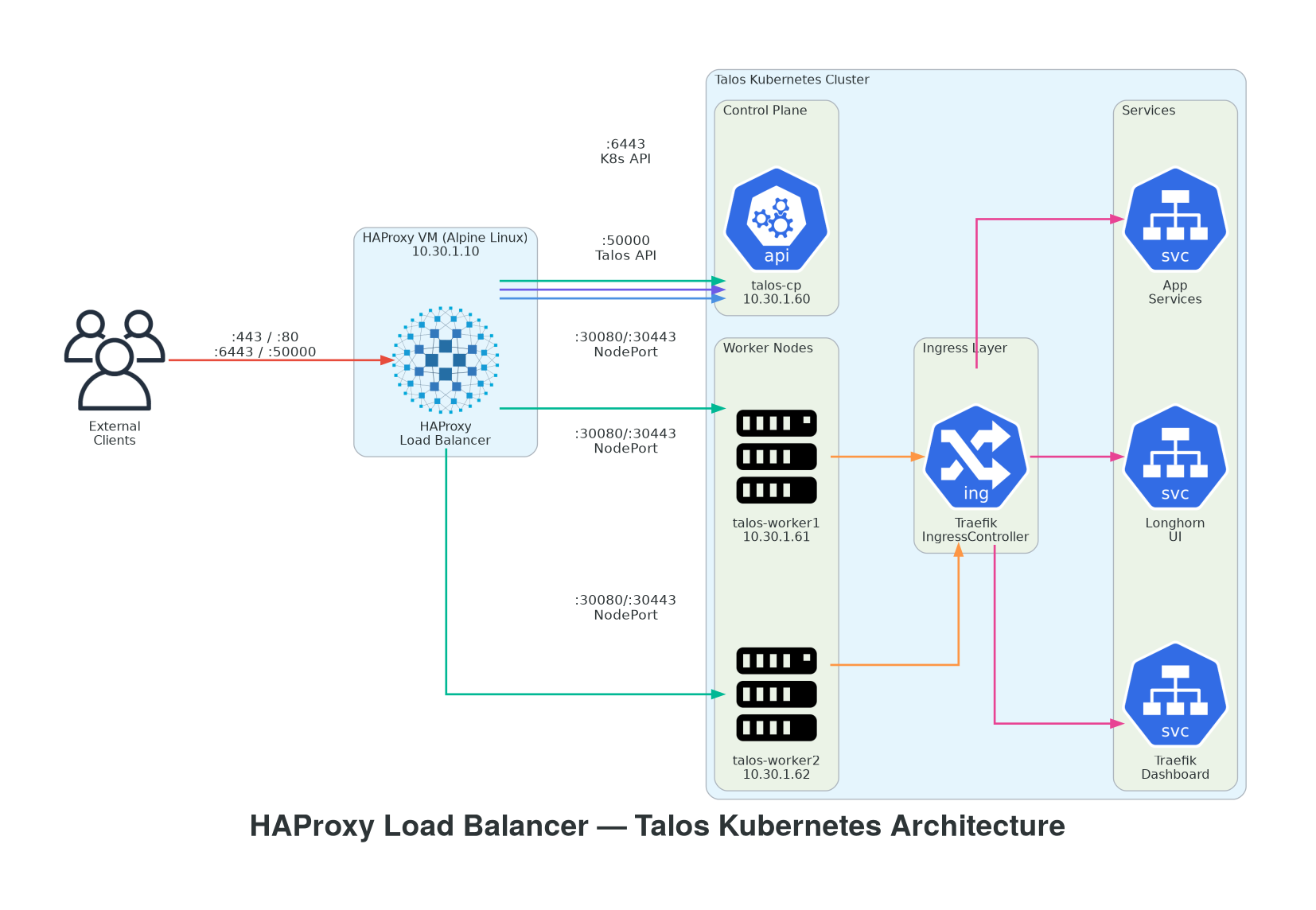
Figure 1 — External clients connect to HAProxy (10.30.1.10). Kubernetes API and Talos API traffic is forwarded to the control plane node. Ingress traffic (HTTP/HTTPS) is round-robin distributed across all three nodes via NodePort, where Traefik routes requests to the correct Services via IngressRoute CRDs.
Infrastructure Components
| Component | IP Address | Role | OS / Platform |
|---|---|---|---|
| haproxy-lb | 10.30.1.10 | Load Balancer | Alpine Linux 3.23 |
| talos-cp | 10.30.1.60 | Control Plane | Talos Linux v1.12.4 |
| talos-worker1 | 10.30.1.61 | Worker Node | Talos Linux v1.12.4 |
| talos-worker2 | 10.30.1.62 | Worker Node | Talos Linux v1.12.4 |
Traffic Flow Map
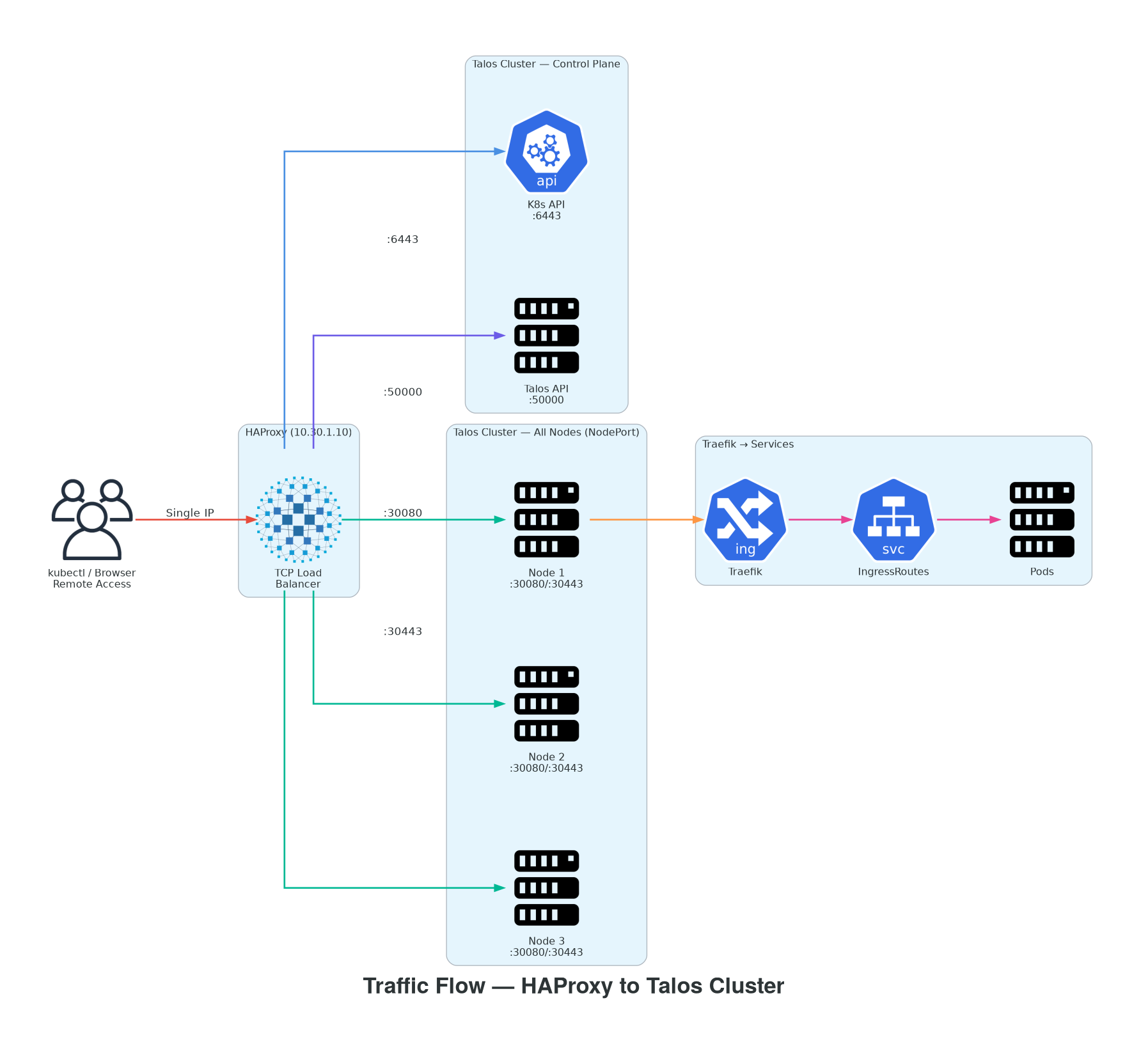
Figure 2 — HAProxy operates in pure TCP mode. Kubernetes API and Talos API traffic goes directly to the control plane. Ingress traffic is distributed across all nodes via NodePort, hitting Traefik which routes to internal Services based on IngressRoute CRD rules.
| Frontend Port | Backend Targets | Service | Mode |
|---|---|---|---|
| :6443 | 10.30.1.60:6443 | Kubernetes API Server | TCP passthrough |
| :50000 | 10.30.1.60:50000 | Talos API | TCP passthrough |
| :80 | All 3 nodes → :30080 | Traefik Ingress (HTTP) | TCP round-robin |
| :443 | All 3 nodes → :30443 | Traefik Ingress (HTTPS) | TCP round-robin |
Why TCP Mode, Not HTTP Mode?
HAProxy runs in mode tcp for every frontend — no HTTP inspection, no TLS termination, no header manipulation. This is intentional. The Kubernetes API server handles its own mTLS. Traefik handles its own ACME certificates and HTTP routing. HAProxy's job is to forward TCP connections and nothing else. This keeps it simple, secure, and completely decoupled from the cluster's TLS configuration.
Implementation — Step by Step
1 Create the Alpine Linux VM on Proxmox
# Create VM — minimal specs for a TCP proxy
# 1 vCPU | 512MB RAM | 8GB disk | Bridge: vmbr0
# Boot: alpine-virt-3.23.3-x86_64.iso

# After boot, run Alpine setup
setup-alpine
# Hostname: haproxy-lb
# Keyboard: de (or your layout)
# Timezone: Europe/Berlin
# Install to disk: setup-disk -m sys /dev/sda

# Remove ISO from Proxmox VM hardware, reboot from disk
2 Configure Static Network
# /etc/network/interfaces
auto lo
iface lo inet loopback

auto eth0
iface eth0 inet static
    address 10.30.1.10
    netmask 255.255.255.0
    gateway 10.30.1.1

# /etc/resolv.conf
nameserver 8.8.8.8
nameserver 8.8.4.4

# Apply and verify
service networking restart
ping -c 3 8.8.8.8
ping -c 3 dl-cdn.alpinelinux.org
3 Install HAProxy and SSH
# Update repos and install
apk update
apk add haproxy openssh

# Enable services on boot
rc-update add haproxy default
rc-update add sshd default

# Start SSH immediately
service sshd start

# Verify SSH access from your workstation
# ssh [email protected]
4 Configure HAProxy — The Full Config
This is the complete /etc/haproxy/haproxy.cfg. Four frontends, four backends, pure TCP mode.
# /etc/haproxy/haproxy.cfg
# ── HAProxy TCP Load Balancer for Talos Kubernetes Cluster ──────────────────

global
    log         /dev/log local0
    maxconn     2048
    daemon

defaults
    mode        tcp
    log         global
    timeout connect   5s
    timeout client   30s
    timeout server   30s
    retries     3
    option      tcplog
    option      dontlognull

# ── Frontend: Kubernetes API Server ─────────────────────────────────────────
frontend k8s_api
    bind *:6443
    default_backend k8s_api_backend

backend k8s_api_backend
    balance roundrobin
    option tcp-check
    server talos-cp 10.30.1.60:6443 check inter 5s fall 3 rise 2

# ── Frontend: Talos API ─────────────────────────────────────────────────────
frontend talos_api
    bind *:50000
    default_backend talos_api_backend

backend talos_api_backend
    balance roundrobin
    option tcp-check
    server talos-cp 10.30.1.60:50000 check inter 5s fall 3 rise 2

# ── Frontend: Traefik Ingress HTTP (NodePort) ───────────────────────────────
frontend ingress_http
    bind *:80
    default_backend ingress_http_backend

backend ingress_http_backend
    balance roundrobin
    option tcp-check
    server talos-cp       10.30.1.60:30080 check inter 5s fall 3 rise 2
    server talos-worker1  10.30.1.61:30080 check inter 5s fall 3 rise 2
    server talos-worker2  10.30.1.62:30080 check inter 5s fall 3 rise 2

# ── Frontend: Traefik Ingress HTTPS (NodePort) ──────────────────────────────
frontend ingress_https
    bind *:443
    default_backend ingress_https_backend

backend ingress_https_backend
    balance roundrobin
    option tcp-check
    server talos-cp       10.30.1.60:30443 check inter 5s fall 3 rise 2
    server talos-worker1  10.30.1.61:30443 check inter 5s fall 3 rise 2
    server talos-worker2  10.30.1.62:30443 check inter 5s fall 3 rise 2
Config Breakdown — What Each Section Does
mode tcp in defaults — every frontend operates at Layer 4. No HTTP parsing, no TLS termination.
check inter 5s fall 3 rise 2 — HAProxy health-checks each backend every 5 seconds. A backend is marked down after 3 consecutive failures, and back up after 2 consecutive successes. This means a dead node stops receiving traffic within 15 seconds.
balance roundrobin — Ingress traffic is evenly distributed across all three nodes. For the API server backends (single control plane), this is a no-op but prepares for future HA expansion with additional control plane nodes.
5 Start HAProxy and Verify
# Validate config syntax before starting
haproxy -c -f /etc/haproxy/haproxy.cfg
# Configuration file is valid

# Start HAProxy
service haproxy start

# Verify all frontends are listening
netstat -tlnp | grep haproxy
# tcp  0  0  0.0.0.0:6443   0.0.0.0:*   LISTEN   haproxy
# tcp  0  0  0.0.0.0:50000  0.0.0.0:*   LISTEN   haproxy
# tcp  0  0  0.0.0.0:80     0.0.0.0:*   LISTEN   haproxy
# tcp  0  0  0.0.0.0:443    0.0.0.0:*   LISTEN   haproxy
6 End-to-End Connectivity Validation
# ── Test Kubernetes API through HAProxy ─────────────────────────────────────
curl -k https://10.30.1.10:6443/healthz
# Expected: 401 Unauthorized (API server is responding, auth required — this is correct)

# ── Test Traefik Ingress through HAProxy ────────────────────────────────────
curl -k https://10.30.1.10/dashboard/
# Expected: 404 (Traefik is responding — host-based routing requires proper hostname)

# ── Test with proper hostname resolution ────────────────────────────────────
# Add to /etc/hosts on your client machine:
# 10.30.1.10  traefik.domain.local  longhorn.domain.local

curl -k https://traefik.domain.local/dashboard/
# Expected: 200 OK — Traefik dashboard is live

curl -k https://longhorn.domain.local
# Expected: 200 OK — Longhorn UI is accessible

# ── Test Talos API through HAProxy ──────────────────────────────────────────
talosctl --talosconfig=./talosconfig \
  --endpoints 10.30.1.10 \
  --nodes 10.30.1.60 \
  health
# Expected: Talos health check passes

# ── Update kubeconfig to use HAProxy endpoint ───────────────────────────────
kubectl --server https://10.30.1.10:6443 get nodes
# NAME              STATUS   ROLES           AGE   VERSION
# talos-cp          Ready    control-plane   12d   v1.32.x
# talos-worker1     Ready    <none>          12d   v1.32.x
# talos-worker2     Ready    <none>          12d   v1.32.x
✓ Validation Checklist
- HAProxy VM: Running on 10.30.1.10, all 4 ports listening
curl -k https://10.30.1.10:6443/healthzreturns 401 (API server responding)- Traefik dashboard accessible via
https://traefik.domain.local - Longhorn UI accessible via
https://longhorn.domain.local kubectl get nodesvia HAProxy IP shows all nodes Readytalosctl healthvia HAProxy endpoint passes
DNS — Making *.domain.local Resolve
Traefik uses host-based routing — requests to traefik.domain.local need to resolve to the HAProxy IP (10.30.1.10). There are three approaches, depending on your setup:
| Approach | Best For | How |
|---|---|---|
| /etc/hosts | Quick testing, single workstation | Add 10.30.1.10 traefik.domain.local longhorn.domain.local to each client |
| dnsmasq on HAProxy VM | Multiple clients on the LAN | Install dnsmasq on the Alpine VM, configure address=/.domain.local/10.30.1.10, point client DNS to 10.30.1.10 |
| Tailscale MagicDNS | Remote partner access over VPN | Add the HAProxy VM to your Tailnet, configure split DNS for domain.local → HAProxy's Tailscale IP |
dnsmasq Setup
Running dnsmasq directly on the HAProxy VM is the cleanest approach for a local network. One wildcard rule resolves all *.domain.local names to the HAProxy IP. No per-service entries needed — any new Traefik IngressRoute automatically works as long as the hostname ends in .domain.local. Setup: apk add dnsmasq, add the address line to /etc/dnsmasq.conf, and point your LAN DHCP server's DNS to 10.30.1.10.
TLS Certificate SAN — The Gotcha That Will Bite You
After setting up HAProxy, you will update your kubeconfig to use https://10.30.1.10:6443 as the server endpoint. The first time you run kubectl get nodes, it might fail with a TLS certificate error: the Kubernetes API server's certificate was issued with SANs for 10.30.1.60 (the control plane IP) but not 10.30.1.10 (the HAProxy IP). The API server doesn't know you're accessing it through a proxy.
Fix: Add HAProxy IP to certSANs
Patch the Talos machine config to include the HAProxy IP in the API server certificate's Subject Alternative Names. This requires a machine config patch and will trigger a certificate rotation:
# Patch Talos machine config to add HAProxy IP to API server certSANs
talosctl patch machineconfig --nodes 10.30.1.60 --patch '[
  {
    "op": "add",
    "path": "/cluster/apiServer/certSANs/-",
    "value": "10.30.1.10"
  }
]'

# Verify the patch applied
talosctl get machineconfig --nodes 10.30.1.60 -o yaml | grep -A5 certSANs

# Update your kubeconfig server endpoint
kubectl config set-cluster domain \
  --server=https://10.30.1.10:6443

# Verify — this should now work without TLS errors
kubectl get nodes
HAProxy VM Specifications
| Spec | Value |
|---|---|
| VM ID | 201 |
| Hostname | haproxy-lb |
| OS | Alpine Linux 3.23.3 (Kernel 6.18.13-0-virt) |
| Resources | 1 vCPU, 512MB RAM, 8GB Disk |
| Network | 10.30.1.10/24 (eth0, vmbr0) |
| Proxmox Node | pve |
| Services | HAProxy, OpenSSH, dnsmasq (planned) |
| Total RAM Usage | ~35MB idle (HAProxy + sshd + OS) |
Scaling Up — Adding Control Plane Nodes Later
The HAProxy config is deliberately structured to make HA expansion trivial. When you add a second or third control plane node, the only change is adding server lines to the API and Talos backends:
# Future HA expansion — just add servers to the existing backends:
backend k8s_api_backend
    balance roundrobin
    option tcp-check
    server talos-cp-1 10.30.1.60:6443  check inter 5s fall 3 rise 2
    server talos-cp-2 10.30.1.63:6443  check inter 5s fall 3 rise 2
    server talos-cp-3 10.30.1.64:6443  check inter 5s fall 3 rise 2

# Same pattern for talos_api_backend
# Reload HAProxy — zero downtime:
haproxy -c -f /etc/haproxy/haproxy.cfg && service haproxy reload
HAProxy Reload vs Kubernetes Reload
Unlike Nginx, HAProxy's reload is graceful by design — it spawns a new process, transfers listeners via socket passing, and drains the old process. Active connections are not dropped. For a TCP proxy with a handful of backends, the reload is instantaneous. Adding a new control plane node to HAProxy takes one config line and one service haproxy reload.
Conclusion: The Simplest Thing That Actually Works
The HAProxy + Alpine combination for Talos Kubernetes is intentionally boring infrastructure. One 512MB VM. One config file. Four TCP frontends. No agents, no operators, no cluster dependencies. It boots in seconds, uses 35MB of RAM, and provides a single stable entry point for your entire cluster — API access, Talos management, and all Ingress traffic.
For a small on-prem deployment, this is the right level of complexity. You don't need MetalLB, you don't need kube-vip, you don't need a cloud load balancer. You need a TCP proxy that forwards connections and gets out of the way. HAProxy does exactly that.
Key Takeaways
- Talos Linux needs an external LB — no built-in load balancing, no SSH, no way to add software to nodes
- Alpine Linux + HAProxy — 512MB RAM, ~35MB in use, boots in seconds, rebuilds in 5 minutes
- Pure TCP mode — Layer 4 passthrough, no TLS termination, cluster handles its own certs
- Four frontends — K8s API (:6443), Talos API (:50000), Ingress HTTP (:80), Ingress HTTPS (:443)
- Health checks built in — dead nodes stop receiving traffic within 15 seconds
- certSANs gotcha — always add the HAProxy IP to the API server's certificate SANs before switching kubeconfig
- Future-proof — adding HA control plane nodes later is one config line per node
"The best infrastructure is the infrastructure you forget is there. A 512MB Alpine VM running HAProxy is exactly that — invisible, reliable, and the first thing that works when everything else is broken."
Running HAProxy in front of your Talos cluster? Using a different approach for on-prem load balancing? Share your setup in the comments below, or reach out to me.