RKE2 ships with Canal (Calico + Flannel) as its default CNI—it works, but it's built on iptables. At scale, iptables becomes the bottleneck nobody planned for: linear rule evaluation, multi-second rule reloads, and network policies that can't see past L4. Cilium replaces that entire stack with eBPF programs running directly in the Linux kernel, giving your RKE2 cluster identity-aware security policies.
Why Replace Canal with Cilium on RKE2?
RKE2's default Canal CNI combines Flannel for overlay networking with Calico for network policy enforcement. It's a proven, stable stack that handles most workloads without complaint. The problem shows up when you start adding network policies at scale, need visibility into what's happening between services, or want security enforcement beyond "allow this IP on this port."
Canal enforces network policies through iptables rules. Every NetworkPolicy object you create
translates to iptables rules on every node. At 500+ services with network policies, you're looking at thousands of
rules per node—and every single packet traverses that chain sequentially. Latency increases linearly, CPU usage
spikes during rule updates, and a single iptables-restore operation can take seconds while packets get
dropped.
Cilium takes a fundamentally different approach. Instead of bolting network logic on top of the kernel's networking stack, it injects purpose-built eBPF programs directly into the kernel datapath. These programs use hash maps for O(1) lookups instead of sequential rule matching, bypass the entire iptables/netfilter stack, and operate on Kubernetes-native identities rather than IP addresses.
RKE2 Cluster with Cilium eBPF Networking
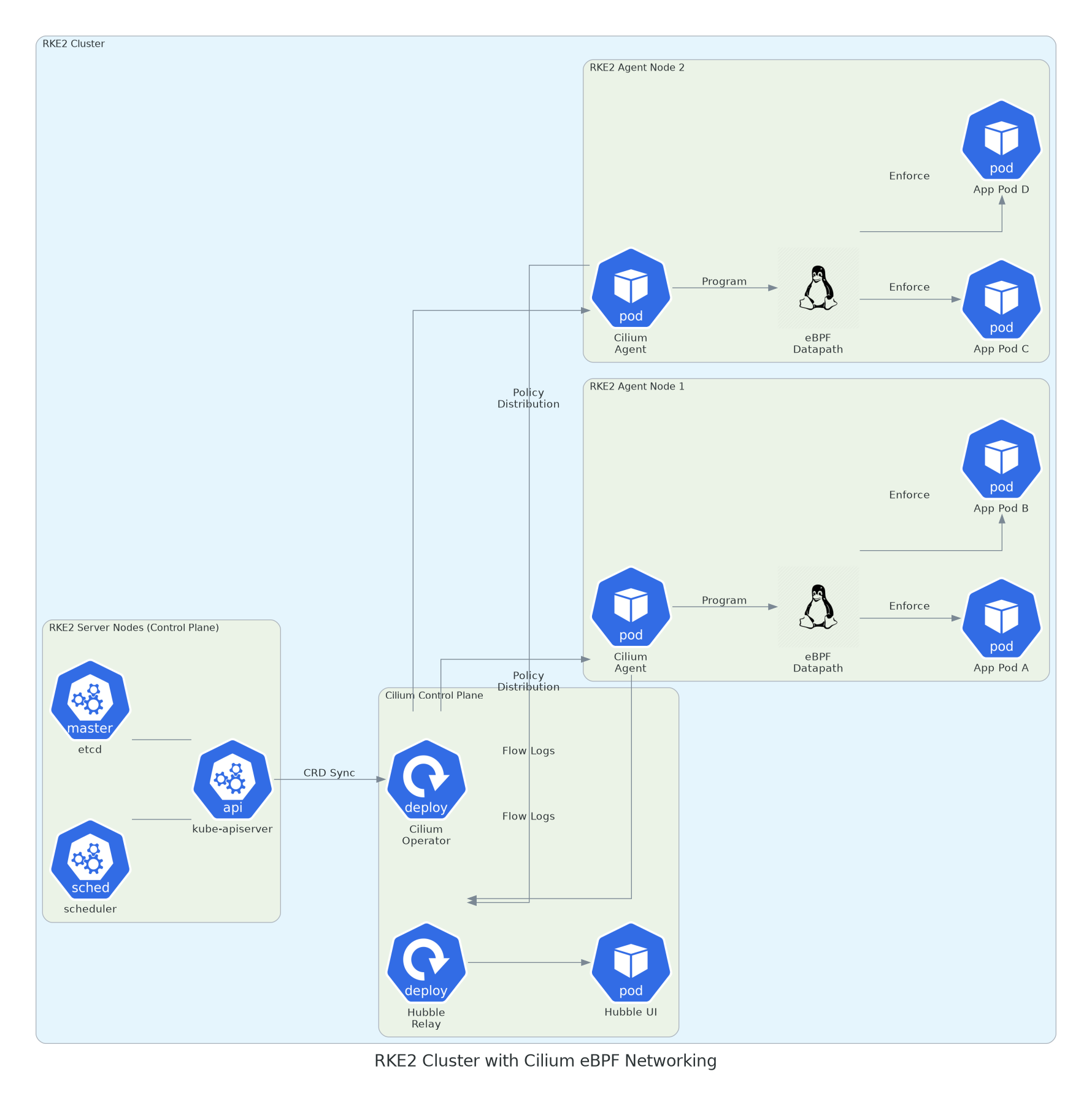
RKE2 server nodes running the control plane with Cilium Operator distributing policies to per-node Cilium Agents on each RKE2 agent node. eBPF datapaths enforce rules directly on every pod. Hubble aggregates flow data for observability.
Key Insight: Identity-Based Security
Unlike Canal that enforces policies based on IP addresses, Cilium assigns cryptographic security identities to workloads based on Kubernetes labels. When a pod gets rescheduled to a new node and gets a new IP, the identity follows it. No stale iptables rules pointing at dead IPs. No race conditions during rolling updates where new pods briefly have no policy enforcement.
eBPF Deep Dive: How the Datapath Actually Works
eBPF (extended Berkeley Packet Filter) is a technology built into the Linux kernel that lets you run sandboxed programs at various hook points—network interfaces, system calls, kernel functions—without modifying kernel source code or loading kernel modules. Cilium leverages this to build a complete networking, security, and observability stack that operates at kernel speed.
Canal's iptables Path vs. Cilium's eBPF Path
Understanding the difference requires looking at what happens when a packet arrives at an RKE2 node. With Canal, a packet enters the kernel networking stack and passes through netfilter hooks: PREROUTING, INPUT, FORWARD, OUTPUT, POSTROUTING. At each hook, every iptables rule is evaluated sequentially. Connection tracking adds another layer of state management. By the time a packet reaches its destination pod, it has traversed dozens of processing stages.
With Cilium, an eBPF program attached at the TC (Traffic Control) ingress hook intercepts the packet immediately. The program performs a single hash-map lookup against the destination identity, applies the policy verdict, and forwards the packet directly—completely bypassing netfilter, iptables, and all the overhead that comes with them.
eBPF Datapath vs Traditional iptables
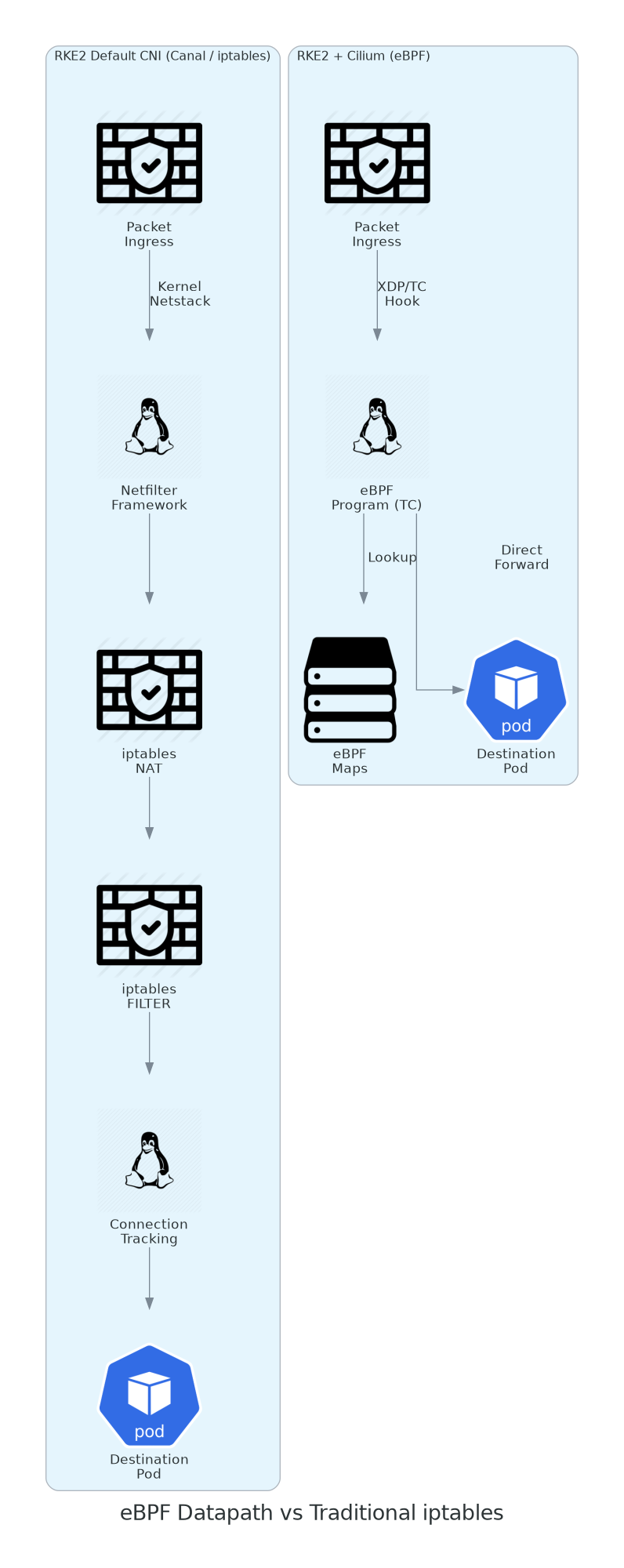
RKE2's Canal CNI routes packets through Netfilter → NAT → FILTER → conntrack before reaching the pod. Replacing it with Cilium's eBPF intercepts at the TC hook, performs a hash-map lookup, and forwards directly—eliminating 4+ processing stages.
eBPF Programs Cilium Attaches
Cilium loads multiple eBPF programs at different kernel hook points depending on the feature set you enable:
| Hook Point | eBPF Program | Purpose |
|---|---|---|
| XDP (eXpress Data Path) | bpf_xdp.c |
DDoS protection, early packet drops before kernel network stack |
| TC Ingress | bpf_lxc.c |
L3/L4/L7 policy enforcement on incoming packets per pod |
| TC Egress | bpf_lxc.c |
Egress policy enforcement and SNAT for external traffic |
| Socket (cgroup/connect) | bpf_sock.c |
Service load balancing at socket level, replacing kube-proxy |
| cgroup/sendmsg | bpf_sockops.c |
Socket-level acceleration for node-local pod communication |
eBPF Maps: The Secret Sauce
eBPF Maps are kernel-resident hash tables shared between eBPF programs and userspace. Cilium uses them to store identity mappings, policy verdicts, connection tracking state, and service endpoints. Because maps use O(1) hash lookups, policy enforcement time stays constant regardless of how many rules exist—unlike iptables where it scales linearly with rule count.
Installing Cilium on RKE2: Replacing Canal
RKE2 supports disabling its default CNI at install time, which is exactly what we need. The key is telling RKE2 to skip Canal so Cilium can take over as the sole CNI. This section walks through a clean RKE2 install with Cilium from the start, plus migration steps if you're running an existing Canal cluster.
RKE2 + Cilium Installation Flow
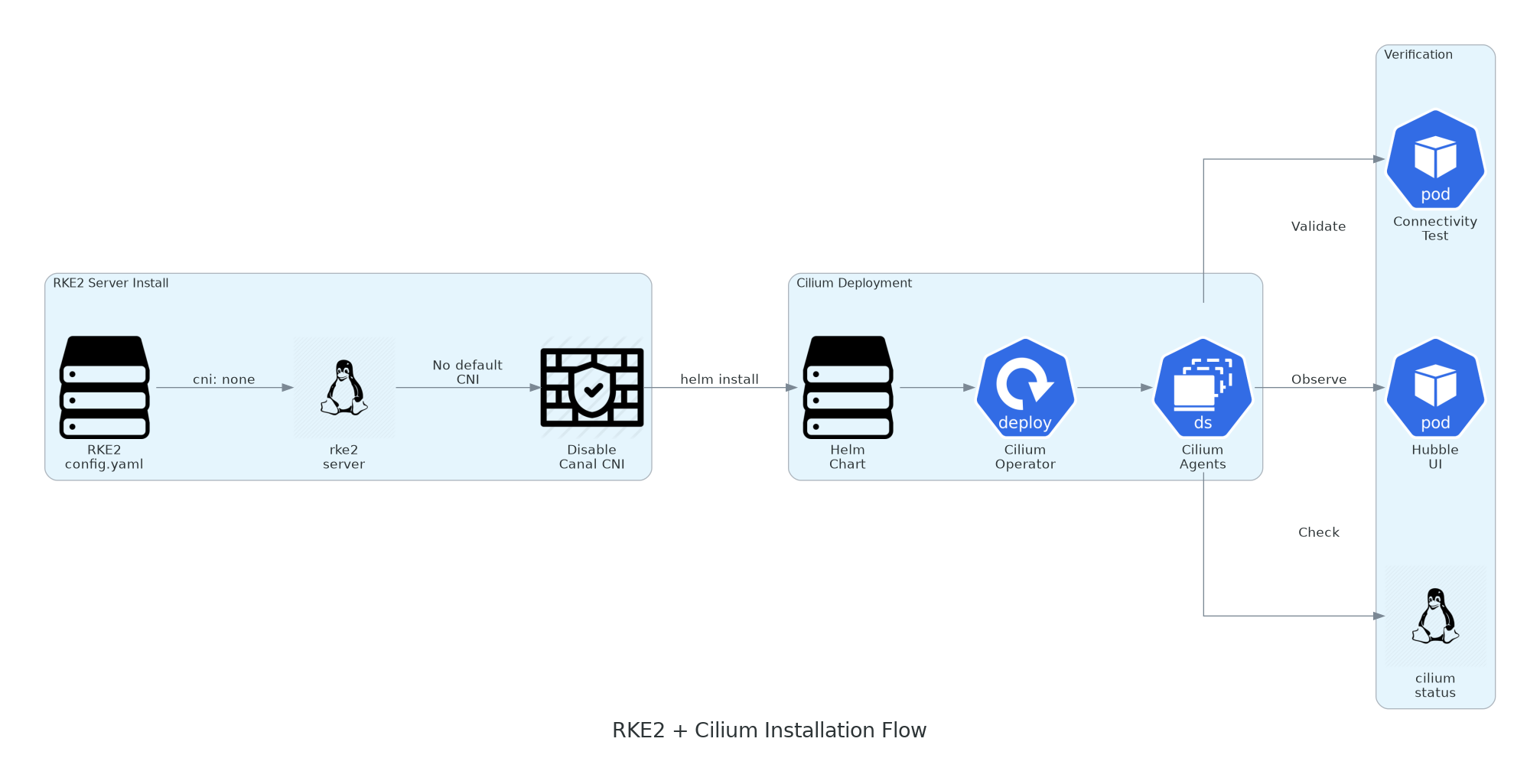
RKE2 is configured with cni: none to disable Canal, then Cilium is
deployed via Helm as the cluster's CNI. Validation runs connectivity tests, checks Hubble, and confirms agent
status across all nodes.
Option A: Fresh RKE2 Install with Cilium
1 Configure RKE2 Server to Skip Default CNI
Create the RKE2 config that disables Canal and prepares for Cilium:
# /etc/rancher/rke2/config.yaml (on each server node)
# Disable the default Canal CNI — Cilium will handle networking
cni: none

# Disable kube-proxy — Cilium's eBPF replaces it entirely
disable-kube-proxy: true

# Cluster networking settings
cluster-cidr: 10.42.0.0/16
service-cidr: 10.43.0.0/16
cluster-dns: 10.43.0.10

# TLS SANs for API server access
tls-san:
  - rke2-server-01.example.com
  - 10.0.1.10
  - rke2-vip.example.com

# Write kubeconfig with correct permissions
write-kubeconfig-mode: "0644"
2 Install RKE2 Server and Agent Nodes
Install RKE2 on the first server node, then join additional servers and agents:
#!/bin/bash
# === Server Node 1 (initial) ===
curl -sfL https://get.rke2.io | INSTALL_RKE2_TYPE=server sh -

# Enable and start RKE2 server
systemctl enable rke2-server
systemctl start rke2-server

# Wait for RKE2 to be ready (pods will be Pending until CNI is installed)
export KUBECONFIG=/etc/rancher/rke2/rke2.yaml
export PATH=$PATH:/var/lib/rancher/rke2/bin

# Grab the node token for joining other nodes
cat /var/lib/rancher/rke2/server/node-token

# === Server Nodes 2 & 3 (add to config.yaml before starting) ===
# Add to /etc/rancher/rke2/config.yaml on joining servers:
# server: https://rke2-server-01.example.com:9345
# token: <node-token-from-server-1>

# === Agent Nodes (workers) ===
curl -sfL https://get.rke2.io | INSTALL_RKE2_TYPE=agent sh -

# /etc/rancher/rke2/config.yaml on agent nodes:
# server: https://rke2-vip.example.com:9345
# token: <node-token-from-server-1>

systemctl enable rke2-agent
systemctl start rke2-agent

# At this point, nodes will be NotReady — expected, no CNI yet
kubectl get nodes
# NAME              STATUS     ROLES                       AGE   VERSION
# rke2-server-01    NotReady   control-plane,etcd,master   2m    v1.30.6+rke2r1
# rke2-server-02    NotReady   control-plane,etcd,master   1m    v1.30.6+rke2r1
# rke2-server-03    NotReady   control-plane,etcd,master   45s   v1.30.6+rke2r1
# rke2-agent-01     NotReady   <none>                30s   v1.30.6+rke2r1
# rke2-agent-02     NotReady   <none>                25s   v1.30.6+rke2r1
Nodes Will Stay NotReady
This is expected. Without a CNI installed, the kubelet can't configure pod networking, so nodes report
NotReady. CoreDNS and other system pods will be stuck in Pending. Everything comes alive
once Cilium is deployed in the next step.
3 Install Cilium via Helm
Deploy Cilium as the cluster's CNI with full eBPF features enabled:
# Install Helm if not present
curl https://raw.githubusercontent.com/helm/helm/main/scripts/get-helm-3 | bash

# Add the Cilium Helm repo
helm repo add cilium https://helm.cilium.io/
helm repo update
# cilium-values.yaml
# Production Cilium configuration for RKE2
# ================================================
# Replace kube-proxy entirely with eBPF
kubeProxyReplacement: true
# Must match RKE2 API server endpoint for kube-proxy replacement
k8sServiceHost: rke2-vip.example.com
k8sServicePort: 6443
# Hubble observability — full stack
hubble:
relay:
enabled: true
ui:
enabled: true
metrics:
enableOpenMetrics: true
enabled:
- dns
- drop
- tcp
- flow
- icmp
- http
# eBPF-based masquerading (replaces iptables SNAT)
bpf:
masquerade: true
tproxy: true
# Bandwidth manager for fair queuing and rate limiting
bandwidthManager:
enabled: true
# IPAM — use Kubernetes host-scope (works with RKE2's 10.42.0.0/16)
ipam:
mode: kubernetes
# Operator settings
operator:
replicas: 2
# Enable Cilium Ingress Controller (optional — replaces nginx-ingress)
ingressController:
enabled: true
default: true
loadbalancerMode: shared
# Monitor aggregation for reduced Hubble overhead in production
monitor:
enabled: false# Deploy Cilium
helm install cilium cilium/cilium \
--version 1.16.5 \
--namespace kube-system \
--values cilium-values.yaml \
--wait --timeout 10m
# Watch nodes come online as Cilium agents start
kubectl get nodes -w
# NAME STATUS ROLES AGE VERSION
# rke2-server-01 Ready control-plane,etcd,master 5m v1.30.6+rke2r1
# rke2-server-02 Ready control-plane,etcd,master 4m v1.30.6+rke2r1
# rke2-server-03 Ready control-plane,etcd,master 3m v1.30.6+rke2r1
# rke2-agent-01 Ready <none> 3m v1.30.6+rke2r1
# rke2-agent-02 Ready <none> 3m v1.30.6+rke2r1
# Verify all Cilium pods are running
kubectl -n kube-system get pods -l app.kubernetes.io/part-of=cilium4 Validate the Installation
Run the Cilium CLI validation suite to confirm everything is operational:
# Install Cilium CLI
CILIUM_CLI_VERSION=$(curl -s https://raw.githubusercontent.com/cilium/cilium-cli/main/stable.txt)
curl -L --fail --remote-name-all \
    https://github.com/cilium/cilium-cli/releases/download/${CILIUM_CLI_VERSION}/cilium-linux-amd64.tar.gz
tar xzvf cilium-linux-amd64.tar.gz -C /usr/local/bin
rm cilium-linux-amd64.tar.gz

# Check Cilium status
cilium status --wait

# Expected output:
#     /¯¯\
#  /¯¯\__/¯¯\    Cilium:             OK
#  \__/¯¯\__/    Operator:           OK
#  /¯¯\__/¯¯\    Envoy DaemonSet:    OK
#  \__/¯¯\__/    Hubble Relay:       OK
#     \__/       ClusterMesh:        disabled
#
# Deployment             cilium-operator    Desired: 2, Ready: 2/2
# DaemonSet              cilium             Desired: 5, Ready: 5/5
# Deployment             hubble-relay       Desired: 1, Ready: 1/1
# Deployment             hubble-ui          Desired: 1, Ready: 1/1

# Run full connectivity test (creates test namespaces, deploys test pods)
cilium connectivity test

# Verify kube-proxy replacement
cilium status | grep KubeProxyReplacement
# KubeProxyReplacement:   True


# Verify eBPF is handling services (zero iptables KUBE- rules)
iptables-save | grep -c "KUBE-SVC"
# Output: 0
Verification Checklist
cilium statusshows all agents healthy across all RKE2 server and agent nodescilium connectivity testpasses all checks including cross-node pod communication- Hubble UI is accessible and showing real-time flow data
- CoreDNS and all system pods are
Running
Option B: Migrating an Existing RKE2 Cluster from Canal to Cilium
If you're running an existing RKE2 cluster with Canal and want to migrate to Cilium, this requires a rolling process. You can't hot-swap CNIs—there will be a brief disruption window. Plan for it during a maintenance window.
#!/bin/bash
# === Canal to Cilium Migration on Running RKE2 ===
# WARNING: This causes a brief network disruption. Schedule a maintenance window.

# Step 1: Cordon and drain nodes one at a time (start with workers)
kubectl cordon rke2-agent-01
kubectl drain rke2-agent-01 --ignore-daemonsets --delete-emptydir-data

# Step 2: On the drained node, update RKE2 config
# /etc/rancher/rke2/config.yaml
# cni: none
# disable-kube-proxy: true

# Step 3: Restart RKE2 on that node
systemctl restart rke2-agent   # or rke2-server for control plane nodes

# Step 4: Repeat for all nodes (agents first, servers last)
# After all nodes are reconfigured, Canal pods will be gone

# Step 5: Clean up Canal remnants
kubectl -n kube-system delete daemonset canal 2>/dev/null || true
kubectl -n kube-system delete daemonset rke2-canal 2>/dev/null || true
kubectl delete crd felixconfigurations.crd.projectcalico.org 2>/dev/null || true

# Step 6: Install Cilium (same helm install as Option A)
helm install cilium cilium/cilium \
    --version 1.16.5 \
    --namespace kube-system \
    --values cilium-values.yaml \
    --wait --timeout 10m

# Step 7: Uncordon all nodes
kubectl uncordon rke2-agent-01
kubectl uncordon rke2-agent-02
# ... repeat for all nodes

# Step 8: Clean up old CNI configs on each node (SSH required)
# rm -f /etc/cni/net.d/10-canal.conflist
# rm -f /etc/cni/net.d/calico-kubeconfig

# Step 9: Validate
cilium status --wait
cilium connectivity test
Migration Risks
During migration, pods will lose network connectivity as the old CNI is removed and before Cilium agents are fully running. Expect 2-5 minutes of downtime per node. Stateful workloads (databases, caches) should be drained gracefully before their node is migrated. Test this process on a non-production cluster first.
CiliumNetworkPolicy: L3/L4/L7 Security Enforcement
Kubernetes NetworkPolicy is limited. It operates at L3/L4 only (IP + port), can't inspect HTTP methods
or paths, doesn't support DNS-based rules, and has no concept of deny policies. CiliumNetworkPolicy extends this
with identity-aware L3/L4 rules, full L7 HTTP/gRPC/Kafka inspection, DNS-aware policies, and explicit deny rules
that override allows.
Cilium Network Policy Enforcement Flow

Three-tier policy enforcement on the RKE2 cluster: frontend can reach backend via HTTPS (L7 allowed), backend can reach database on TCP 5432 (L4 allowed), unauthorized pods and frontend-to-database traffic are denied by identity-based eBPF policies.
Hubble: eBPF-Powered Observability
Network policies are useless if you can't see what's happening. Hubble is Cilium's built-in observability platform that captures every network flow at the eBPF level—zero application changes, zero sidecars, zero performance overhead. It gives you real-time visibility into which services are talking to each other, what's being allowed or denied, DNS resolution patterns, and HTTP request/response metrics.
Hubble Observability and Flow Monitoring
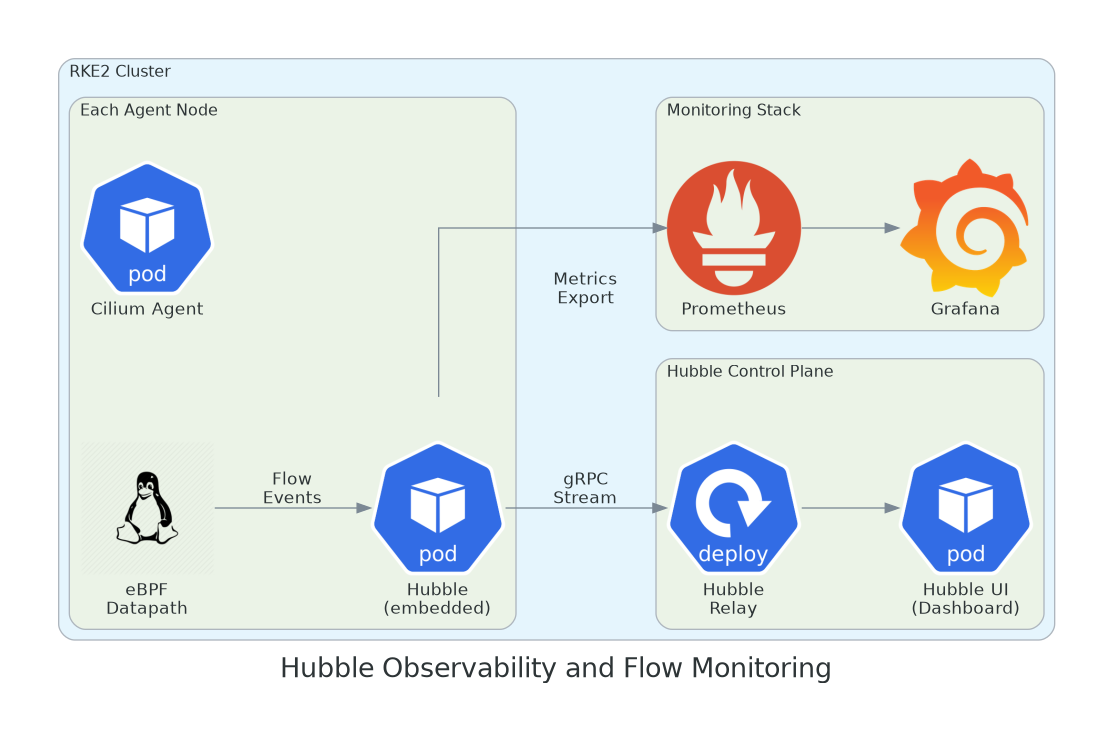
eBPF datapath on each RKE2 agent node emits flow events to the embedded Hubble observer in each Cilium Agent. Events stream via gRPC to Hubble Relay for aggregation, with metrics exported to Prometheus and visualized in Grafana.
Using Hubble CLI for Real-Time Debugging
# Install Hubble CLI
HUBBLE_VERSION=$(curl -s https://raw.githubusercontent.com/cilium/hubble/main/stable.txt)
curl -L --fail --remote-name-all \
    https://github.com/cilium/hubble/releases/download/${HUBBLE_VERSION}/hubble-linux-amd64.tar.gz
tar xzvf hubble-linux-amd64.tar.gz -C /usr/local/bin
rm hubble-linux-amd64.tar.gz

# Port-forward to Hubble Relay
kubectl -n kube-system port-forward svc/hubble-relay 4245:80 &

# Observe all traffic in the backend namespace
hubble observe --namespace backend --follow

# Filter for denied traffic — your go-to for debugging policy issues
hubble observe --verdict DENIED --follow

# Watch specific pod-to-pod communication
hubble observe --from-pod backend/backend-api-7d4f5c \
    --to-pod database/postgres-0 \
    --protocol TCP \
    -o json | jq '.'

# DNS query monitoring — see what your pods are resolving
hubble observe --type l7 --protocol DNS --namespace backend

# HTTP flow analysis — method, path, response codes, latency
hubble observe --type l7 --protocol HTTP --namespace frontend \
    -o compact

# Find who's talking to a specific service
hubble observe --to-label app=postgres --follow -o compact
Production Hardening and Troubleshooting
Essential Cilium Health Checks for RKE2
#!/bin/bash
# === Comprehensive Cilium Health Check for RKE2 ===
echo "=== RKE2 Node Status ==="
kubectl get nodes -o wide

echo -e "\n=== Cilium Agent Status ==="
cilium status --verbose

echo -e "\n=== Cilium Agent on Each Node ==="
kubectl -n kube-system get pods -l k8s-app=cilium -o wide

echo -e "\n=== Node Connectivity ==="
kubectl -n kube-system exec ds/cilium -- cilium node list

echo -e "\n=== Active Endpoints ==="
kubectl -n kube-system exec ds/cilium -- cilium endpoint list | head -30

echo -e "\n=== Policy Enforcement Status ==="
kubectl -n kube-system exec ds/cilium -- cilium policy get | head -40


echo -e "\n=== eBPF Service Map (kube-proxy replacement) ==="
kubectl -n kube-system exec ds/cilium -- cilium service list | head -20

echo -e "\n=== Recent Policy Denials ==="
hubble observe --verdict DENIED --last 50 -o compact 2>/dev/null || \
    echo "Hubble not port-forwarded. Run: kubectl -n kube-system port-forward svc/hubble-relay 4245:80"

echo -e "\n=== BPF Program Attachments ==="
kubectl -n kube-system exec ds/cilium -- cilium bpf prog list | head -20
Common Issues on RKE2 and Fixes
1. Nodes Stay NotReady After Cilium Install
Check that /etc/cni/net.d/ on each node contains only Cilium's config. Leftover Canal configs
(10-canal.conflist) cause kubelet to use the wrong CNI. Delete old configs and restart kubelet:
systemctl restart rke2-agent.
2. Intermittent DNS Failures
Cilium intercepts DNS at the eBPF level. If your default-deny policy doesn't explicitly allow egress to
kube-dns on UDP/TCP 53, DNS breaks cluster-wide. Always include the DNS exemption in your
cluster-wide deny policy.
3. L7 Policy Not Enforcing
L7 enforcement requires Cilium's Envoy proxy. Verify it's running: cilium status | grep Envoy. If
missing, check that envoy images were pulled successfully and that bpf.tproxy: true is
set in your Helm values.
4. RKE2 Upgrade Breaks Cilium
RKE2 upgrades can reset the /etc/rancher/rke2/config.yaml or reinstall Canal. Always verify
cni: none and disable-kube-proxy: true are present after an RKE2 upgrade. Pin your
config with a configuration management tool (Ansible, etc.).
5. Cross-Node Pod Communication Fails
Default tunnel mode is VXLAN (UDP 8472 between nodes). Verify this port is open in your firewall/security
groups. For bare-metal RKE2, also check that the cilium_vxlan interface exists on each node:
ip link show cilium_vxlan.
6. Cilium Agent CrashLoopBackOff
Usually kernel version incompatibility. Cilium requires Linux 4.19+ for basic features and 5.10+ for full eBPF
(bandwidth manager). RKE2 on Ubuntu 22.04 (kernel 5.15) or RHEL 9 (kernel 5.14) works well. Check
with uname -r.
Cilium vs. RKE2 Default Stack: When to Switch
| Feature | Cilium (eBPF) | Canal (RKE2 Default) | Calico (Standalone) |
|---|---|---|---|
| Dataplane | eBPF (kernel-native) | iptables (Calico + Flannel) | iptables or eBPF (beta) |
| L7 Policy (HTTP/gRPC) | Native with Envoy | Not supported | Requires Istio |
| kube-proxy Replacement | Full eBPF | Requires kube-proxy | eBPF (beta) |
| Built-in Observability | Hubble (flows, DNS, HTTP) | Basic flow logs | Basic flow logs |
| Service Mesh | Sidecar-free | Requires Istio/Linkerd | Requires Istio/Linkerd |
| Multi-Cluster | Cluster Mesh (native) | Not supported | Federation (limited) |
| Kernel Requirement | 4.19+ (5.10+ recommended) | Any | Any |
| RKE2 Integration | Manual (Helm install) | Built-in (default) | Manual (replace Canal) |
| Best For | Production at scale, zero-trust | Simple clusters, quick setup | Hybrid migration path |
When Canal is Good Enough
If you're running a small RKE2 cluster with <50 pods, don't need L7 policies, don't require transparent
encryption, and basic NetworkPolicy objects cover your security requirements—Canal is perfectly fine.
It's battle-tested, ships with RKE2, and requires zero extra setup. Cilium's value shows up at scale, in
compliance-heavy environments, or when you need observability and security enforcement that goes beyond what
iptables-based CNIs can deliver.
Conclusion: When to Replace Canal with Cilium on RKE2
Cilium represents a fundamental shift in how Kubernetes handles networking and security. By moving policy enforcement, load balancing, and observability into the Linux kernel via eBPF, it eliminates the performance cliffs that plague iptables-based CNIs at scale. On RKE2 specifically, the combination of disabling Canal and kube-proxy in favor of Cilium's unified eBPF stack simplifies the networking layer while dramatically increasing its capabilities.
The swap makes sense when you need L7-aware security policies that can enforce HTTP methods and paths, not just IPs and ports. When you need transparent encryption for compliance without the overhead of a full service mesh. When you need network observability that shows you exactly which services are communicating and what's being denied. And when you're scaling beyond the point where thousands of iptables rules per node become the bottleneck your on-call team dreads.
Key Takeaways
- RKE2 supports Cilium by setting
cni: noneanddisable-kube-proxy: truein the server config - Cilium replaces both Canal and kube-proxy with a single eBPF-based networking stack
- CiliumNetworkPolicy supports L3/L4/L7 rules with HTTP method/path enforcement and DNS-aware egress
- Hubble provides real-time network observability without application changes or sidecar proxies
- Migration from Canal requires a maintenance window—plan for 2-5 minutes of downtime per node
"The best network policy is one you can actually observe, debug, and trust at scale. eBPF gives us all three. If your RKE2 cluster has outgrown Canal's iptables—and you'll know because your on-call team will tell you—Cilium is the production-grade path forward."
Next in the series — Part 6: GitOps with ArgoCD on RKE2. Running Cilium on your RKE2 clusters? Hit any gotchas during the Canal migration? Share your experience in the comments below, or reach out to me.