Stop SSH-ing into servers to run kubectl apply. GitOps means your Git repo is the single source of truth — every change goes through a pull request, every deployment is auditable, and your cluster self-heals when someone manually edits a resource. ArgoCD watches your repo and continuously reconciles what's declared in Git with what's running in your RKE2 cluster. This guide covers what ArgoCD is, how its components work, and walks through deploying a full CRUD application with monitoring on a single-node RKE2 cluster — all managed by GitOps.
What is GitOps?
GitOps is an operational model where your entire infrastructure and application state lives in Git. You don't deploy by running commands — you deploy by merging a pull request. A GitOps operator running inside your cluster watches the repo, detects drift between the declared state and the live state, and automatically reconciles the difference.
The core principles are simple: Git is the single source of truth for declarative infrastructure. All changes are made through Git (pull requests, reviews, audit trail). The system automatically applies changes and self-heals when drift is detected. And the desired state is always described declaratively — YAML, Helm charts, or Kustomize overlays.
Why GitOps over kubectl apply?
With kubectl apply, there's no record of who deployed what, when, or why. Someone can SSH into a node and change a deployment, and nobody knows until something breaks. GitOps enforces that every change is a Git commit — reviewable, revertable, and auditable. Rollbacks become git revert. Disaster recovery becomes argocd app sync against the same repo.
What is ArgoCD?
ArgoCD is a declarative GitOps continuous delivery tool for Kubernetes. It's a CNCF graduated project that runs inside your cluster, watches one or more Git repositories, and continuously compares the desired state (what's in Git) against the live state (what's actually running). When they diverge — whether from a new commit or someone manually editing a resource — ArgoCD reconciles back to Git.
GitOps Reconciliation Loop
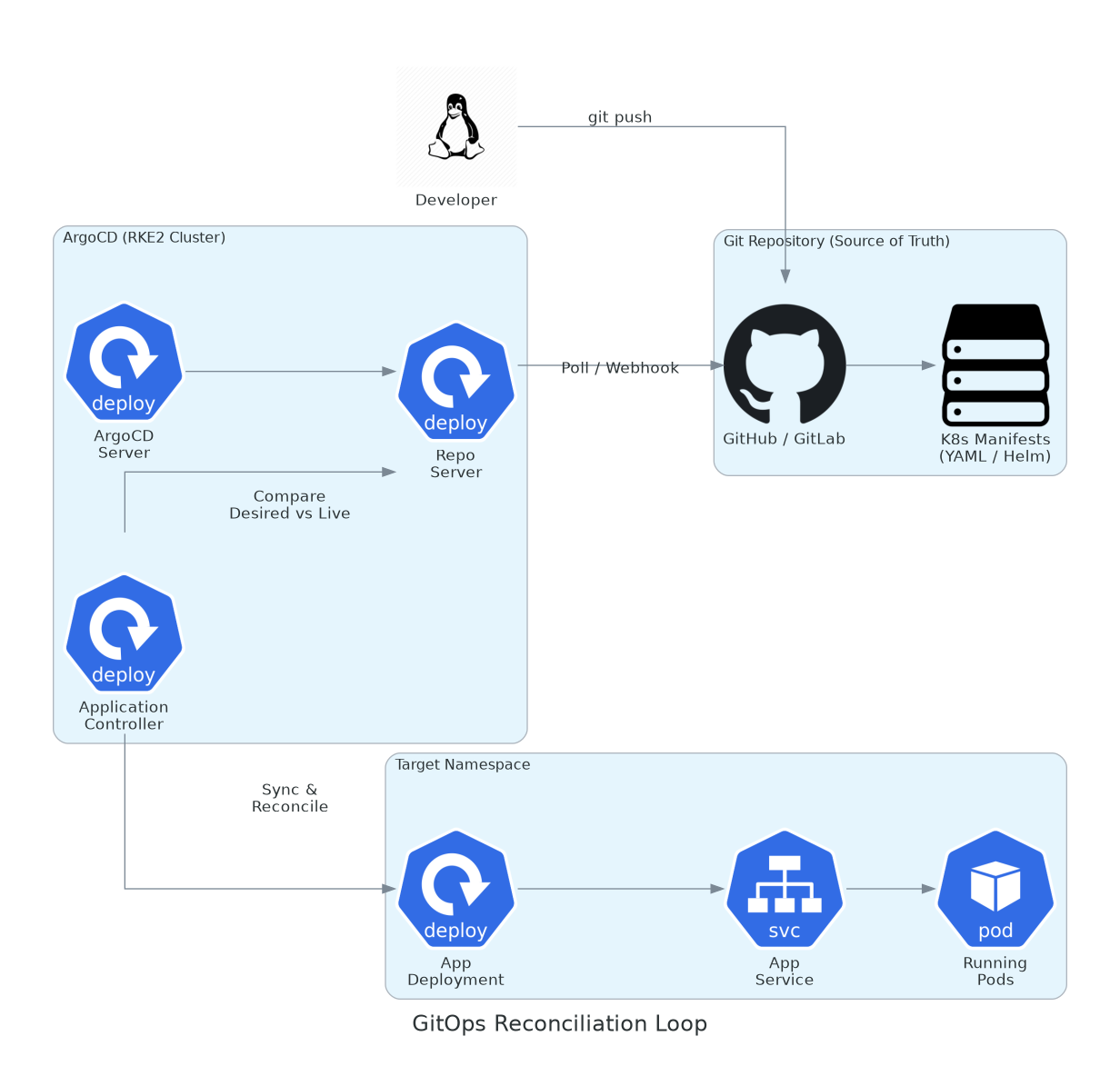
A developer pushes to Git. The ArgoCD Repo Server detects the change, the Application Controller compares desired vs live state, and syncs the cluster to match Git — automatically.
ArgoCD Core Components
ArgoCD runs as a set of microservices inside your cluster. Each one has a specific job:
ArgoCD Architecture Components
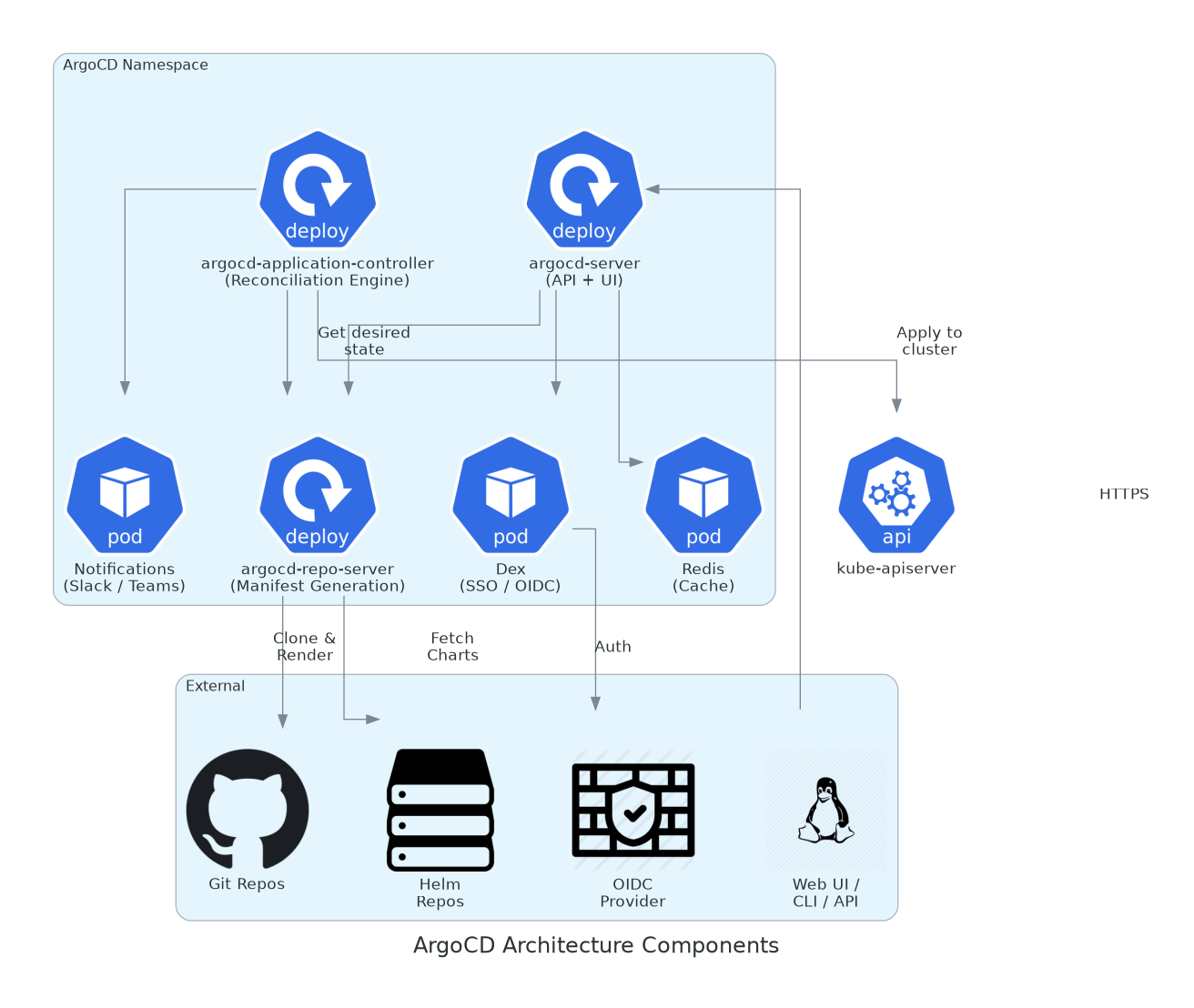
ArgoCD Server handles the UI/API, Repo Server clones repos and renders manifests, Application Controller is the reconciliation engine that compares and applies state. Redis caches, Dex handles SSO, and the Notification controller alerts on sync events.
| Component | What It Does |
|---|---|
| argocd-server | Exposes the Web UI, REST API, and gRPC API. This is what you interact with — the dashboard where you see app status, trigger syncs, and view diffs. |
| argocd-repo-server | Clones Git repos, renders Helm templates, processes Kustomize overlays, and serves the resulting plain YAML to the controller. It caches results in Redis to avoid re-cloning on every check. |
| argocd-application-controller | The brain. Continuously compares the desired state (from repo-server) against the live state (from the Kubernetes API). When drift is detected, it reconciles — either automatically or waiting for manual approval. |
| Redis | In-memory cache for repo-server. Stores cloned repo contents and rendered manifests so frequent polls don't hammer Git. |
| Dex | Identity provider bridge. Connects ArgoCD to your SSO — GitHub OAuth, OIDC, LDAP, SAML. Not required for basic setups. |
| Notifications Controller | Sends sync status, health changes, and error alerts to Slack, Teams, email, or webhooks. |
Hands-On: Full GitOps Stack on a Single-Node RKE2
Let's build something real. We'll set up a single-node RKE2 cluster, install ArgoCD, and deploy a complete CRUD application (React frontend + Node.js API + PostgreSQL) with Grafana monitoring — all managed through Git. One push to the repo, and everything deploys.
Single-Node RKE2 GitOps Stack
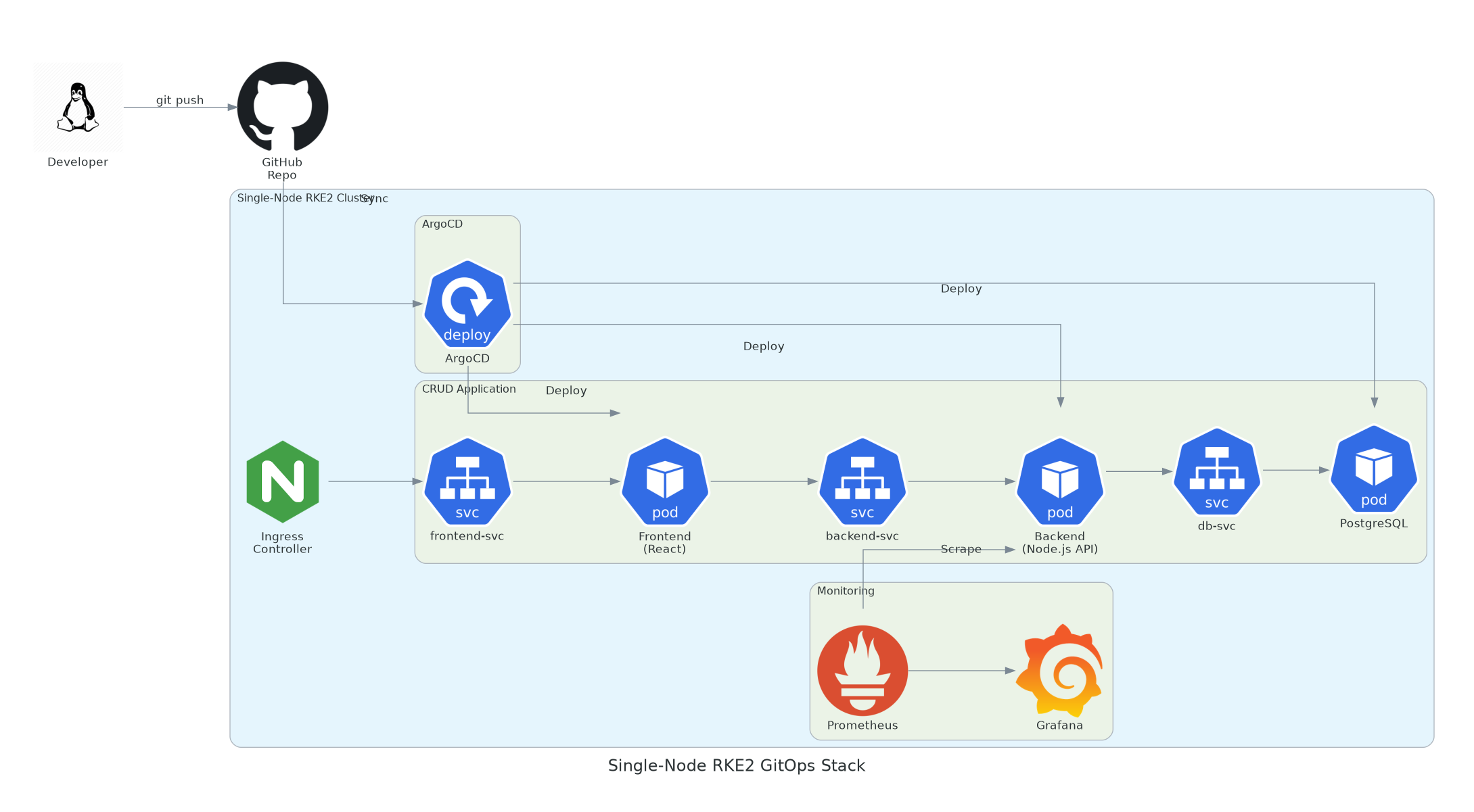
A developer pushes to GitHub. ArgoCD syncs the changes, deploying the CRUD app (frontend, backend, database) and monitoring stack. Ingress routes external traffic. Everything declared in Git.
1 Set Up the Single-Node RKE2 Cluster
Install RKE2 as both server and agent on one machine:
# Install RKE2
curl -sfL https://get.rke2.io | INSTALL_RKE2_TYPE=server sh -

# Minimal config for single node
cat > /etc/rancher/rke2/config.yaml <<EOF
write-kubeconfig-mode: "0644"
tls-san:
  - $(hostname)
  - $(hostname -I | awk '{print $1}')
# Single node — allow workloads on the control plane
node-taint: []
EOF

# Start RKE2
systemctl enable rke2-server && systemctl start rke2-server

# Set up kubectl
export KUBECONFIG=/etc/rancher/rke2/rke2.yaml
export PATH=$PATH:/var/lib/rancher/rke2/bin
echo 'export KUBECONFIG=/etc/rancher/rke2/rke2.yaml' >> ~/.bashrc
echo 'export PATH=$PATH:/var/lib/rancher/rke2/bin' >> ~/.bashrc

# Verify — single node should be Ready
kubectl get nodes
2 Install ArgoCD
Deploy ArgoCD into the cluster and expose the dashboard:
# Create namespace and install ArgoCD
kubectl create namespace argocd
kubectl apply -n argocd -f \
  https://raw.githubusercontent.com/argoproj/argo-cd/stable/manifests/install.yaml

# Wait for all pods to be ready
kubectl -n argocd wait --for=condition=ready pod --all --timeout=300s

# Get the initial admin password
kubectl -n argocd get secret argocd-initial-admin-secret \
  -o jsonpath="{.data.password}" | base64 -d && echo

# Expose the ArgoCD UI (for single-node, NodePort is simplest)
kubectl -n argocd patch svc argocd-server -p \
  '{"spec": {"type": "NodePort", "ports": [{"port": 443, "nodePort": 30443}]}}'

# Access ArgoCD UI at https://<node-ip>:30443
# Login: admin / <password from above>

# Install ArgoCD CLI
curl -sSL -o argocd https://github.com/argoproj/argo-cd/releases/latest/download/argocd-linux-amd64
chmod +x argocd && mv argocd /usr/local/bin/

# Login via CLI
argocd login <node-ip>:30443 --username admin --password <password> --insecure
3 Structure the Git Repository
Create the repo structure that ArgoCD will watch. This is the source of truth for everything:
# Git repo structure
gitops-rke2-cluster/
├── apps/                          # ArgoCD Application manifests
│   ├── root-app.yaml              # App-of-Apps (manages everything)
│   ├── crud-frontend.yaml
│   ├── crud-backend.yaml
│   ├── crud-database.yaml
│   └── monitoring.yaml
├── manifests/
│   ├── crud-app/
│   │   ├── namespace.yaml
│   │   ├── frontend-deployment.yaml
│   │   ├── frontend-service.yaml
│   │   ├── backend-deployment.yaml
│   │   ├── backend-service.yaml
│   │   ├── backend-configmap.yaml
│   │   ├── database-statefulset.yaml
│   │   ├── database-service.yaml
│   │   ├── database-pvc.yaml
│   │   ├── database-secret.yaml
│   │   └── ingress.yaml
│   └── monitoring/
│       ├── namespace.yaml
│       └── kube-prometheus-values.yaml
└── README.md
4 Define the CRUD Application Manifests
Create all the Kubernetes resources for the CRUD app. These go in manifests/crud-app/:
# manifests/crud-app/namespace.yaml
apiVersion: v1
kind: Namespace
metadata:
  name: crud-app
---
# manifests/crud-app/database-secret.yaml
apiVersion: v1
kind: Secret
metadata:
  name: postgres-credentials
  namespace: crud-app
type: Opaque
stringData:
  POSTGRES_USER: crudadmin
  POSTGRES_PASSWORD: changeme-use-sealed-secrets
  POSTGRES_DB: cruddb
---
# manifests/crud-app/database-pvc.yaml
apiVersion: v1
kind: PersistentVolumeClaim
metadata:
  name: postgres-data
  namespace: crud-app
spec:
  accessModes: [ReadWriteOnce]
  resources:
    requests:
      storage: 5Gi
---
# manifests/crud-app/database-statefulset.yaml
apiVersion: apps/v1
kind: StatefulSet
metadata:
  name: postgres
  namespace: crud-app
spec:
  serviceName: db-svc
  replicas: 1
  selector:
    matchLabels:
      app: postgres
  template:
    metadata:
      labels:
        app: postgres
    spec:
      containers:
        - name: postgres
          image: postgres:16-alpine
          ports:
            - containerPort: 5432
          envFrom:
            - secretRef:
                name: postgres-credentials
          volumeMounts:
            - name: data
              mountPath: /var/lib/postgresql/data
          resources:
            requests:
              cpu: 100m
              memory: 256Mi
            limits:
              cpu: 500m
              memory: 512Mi
      volumes:
        - name: data
          persistentVolumeClaim:
            claimName: postgres-data
---
# manifests/crud-app/database-service.yaml
apiVersion: v1
kind: Service
metadata:
  name: db-svc
  namespace: crud-app
spec:
  selector:
    app: postgres
  ports:
    - port: 5432
      targetPort: 5432
# manifests/crud-app/backend-configmap.yaml
apiVersion: v1
kind: ConfigMap
metadata:
name: backend-config
namespace: crud-app
data:
DB_HOST: db-svc
DB_PORT: "5432"
PORT: "3000"
---
# manifests/crud-app/backend-deployment.yaml
apiVersion: apps/v1
kind: Deployment
metadata:
name: crud-backend
namespace: crud-app
spec:
replicas: 2
selector:
matchLabels:
app: crud-backend
template:
metadata:
labels:
app: crud-backend
spec:
containers:
- name: api
image: your-registry/crud-backend:v1.0.0
ports:
- containerPort: 3000
envFrom:
- configMapRef:
name: backend-config
- secretRef:
name: postgres-credentials
readinessProbe:
httpGet:
path: /healthz
port: 3000
initialDelaySeconds: 5
resources:
requests:
cpu: 100m
memory: 128Mi
limits:
cpu: 300m
memory: 256Mi
---
# manifests/crud-app/backend-service.yaml
apiVersion: v1
kind: Service
metadata:
name: backend-svc
namespace: crud-app
spec:
selector:
app: crud-backend
ports:
- port: 3000
targetPort: 3000# manifests/crud-app/frontend-deployment.yaml
apiVersion: apps/v1
kind: Deployment
metadata:
name: crud-frontend
namespace: crud-app
spec:
replicas: 2
selector:
matchLabels:
app: crud-frontend
template:
metadata:
labels:
app: crud-frontend
spec:
containers:
- name: frontend
image: your-registry/crud-frontend:v1.0.0
ports:
- containerPort: 80
env:
- name: API_URL
value: "http://backend-svc:3000"
resources:
requests:
cpu: 50m
memory: 64Mi
limits:
cpu: 200m
memory: 128Mi
---
# manifests/crud-app/frontend-service.yaml
apiVersion: v1
kind: Service
metadata:
name: frontend-svc
namespace: crud-app
spec:
selector:
app: crud-frontend
ports:
- port: 80
targetPort: 80
---
# manifests/crud-app/ingress.yaml
apiVersion: networking.k8s.io/v1
kind: Ingress
metadata:
name: crud-ingress
namespace: crud-app
spec:
ingressClassName: nginx
rules:
- host: crud.example.local
http:
paths:
- path: /
pathType: Prefix
backend:
service:
name: frontend-svc
port:
number: 80
- path: /api
pathType: Prefix
backend:
service:
name: backend-svc
port:
number: 30005 Create the ArgoCD Application Definitions
These tell ArgoCD what to watch and where to deploy it. We'll use the App-of-Apps pattern — one root app that manages all the others:
ArgoCD UI — Application Details Tree
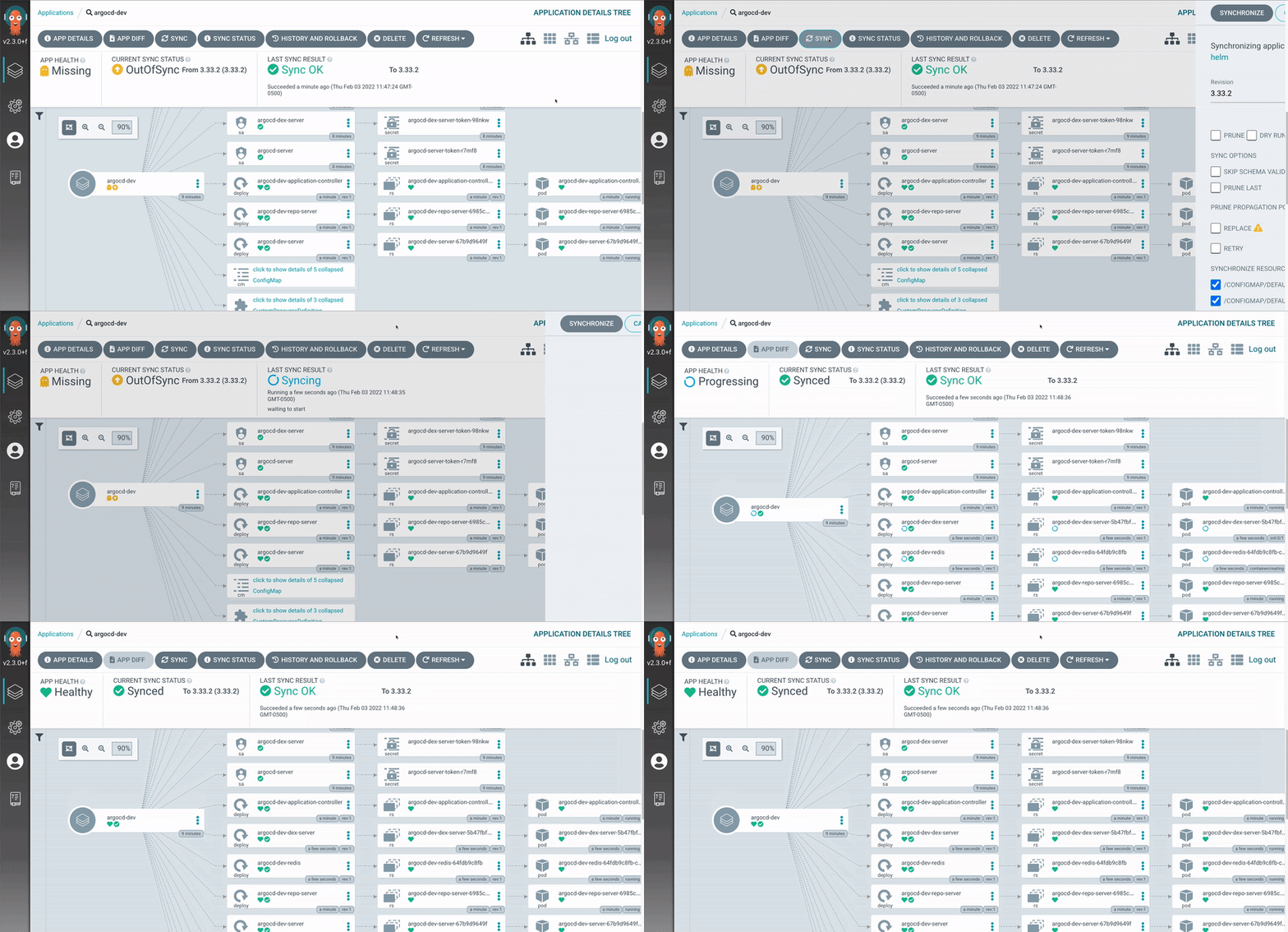
This is what it looks like in practice. The ArgoCD UI shows the full resource tree — the root Application fans out to Deployments, ReplicaSets, Pods, Services, ConfigMaps, and Secrets. Sync status, health, and revision info are visible at a glance.
# apps/crud-app.yaml
apiVersion: argoproj.io/v1alpha1
kind: Application
metadata:
  name: crud-app
  namespace: argocd
  finalizers:
    - resources-finalizer.argocd.argoproj.io
spec:
  project: default
  source:
    repoURL: https://github.com/your-org/gitops-rke2-cluster.git
    targetRevision: main
    path: manifests/crud-app
  destination:
    server: https://kubernetes.default.svc
    namespace: crud-app
  syncPolicy:
    automated:
      prune: true        # Delete resources removed from Git
      selfHeal: true     # Revert manual changes back to Git state
    syncOptions:
      - CreateNamespace=true
      - PrunePropagationPolicy=foreground
    retry:
      limit: 3
      backoff:
        duration: 10s
        factor: 2
        maxDuration: 3m
# apps/monitoring.yaml
apiVersion: argoproj.io/v1alpha1
kind: Application
metadata:
name: monitoring
namespace: argocd
spec:
project: default
source:
repoURL: https://prometheus-community.github.io/helm-charts
chart: kube-prometheus-stack
targetRevision: 65.1.0
helm:
valuesObject:
grafana:
adminPassword: admin
service:
type: NodePort
nodePort: 30080
dashboardProviders:
dashboardproviders.yaml:
apiVersion: 1
providers:
- name: default
folder: ''
type: file
options:
path: /var/lib/grafana/dashboards/default
prometheus:
prometheusSpec:
retention: 7d
resources:
requests:
cpu: 200m
memory: 512Mi
destination:
server: https://kubernetes.default.svc
namespace: monitoring
syncPolicy:
automated:
prune: true
selfHeal: true
syncOptions:
- CreateNamespace=true
- ServerSideApply=true# apps/root-app.yaml — The App-of-Apps
apiVersion: argoproj.io/v1alpha1
kind: Application
metadata:
name: cluster-apps
namespace: argocd
spec:
project: default
source:
repoURL: https://github.com/your-org/gitops-rke2-cluster.git
targetRevision: main
path: apps
destination:
server: https://kubernetes.default.svc
namespace: argocd
syncPolicy:
automated:
prune: true
selfHeal: true6 Deploy Everything
Push the repo to GitHub, then apply only the root app — ArgoCD handles the rest:
# Push everything to Git
cd gitops-rke2-cluster
git add -A
git commit -m "Initial GitOps: CRUD app + monitoring stack"
git push origin main

# Apply ONLY the root app — it bootstraps everything else
kubectl apply -f apps/root-app.yaml

# Watch ArgoCD deploy the entire stack
argocd app list
# NAME          CLUSTER                         NAMESPACE    STATUS  HEALTH
# cluster-apps  https://kubernetes.default.svc  argocd       Synced  Healthy
# crud-app      https://kubernetes.default.svc  crud-app     Synced  Healthy
# monitoring    https://kubernetes.default.svc  monitoring   Synced  Healthy

# Access your apps:
# ArgoCD UI:  https://<node-ip>:30443
# Grafana:    http://<node-ip>:30080
# CRUD App:   http://<node-ip> (via ingress)
What Just Happened
You applied one YAML file (root-app.yaml). ArgoCD read the apps/ directory, found two Application definitions (crud-app and monitoring), and deployed everything automatically — the namespace, database, backend, frontend, ingress, Prometheus, and Grafana. Now every git push to the repo triggers an automatic sync. No more kubectl apply.
The Deployment Workflow
With the GitOps stack running, here's how day-to-day changes work. Want to update the backend to v1.1.0? Change one line in Git:
# Update the image tag in manifests/crud-app/backend-deployment.yaml
# image: your-registry/crud-backend:v1.0.0
# →
# image: your-registry/crud-backend:v1.1.0

git add manifests/crud-app/backend-deployment.yaml
git commit -m "feat: bump backend to v1.1.0 — adds pagination endpoint"
git push origin main

# ArgoCD detects the change within 3 minutes (default poll interval)
# or instantly if you set up a GitHub webhook:
argocd app get crud-app
# Health: Healthy
# Sync:   Synced
# Last Sync: 30 seconds ago
Need to roll back? git revert HEAD && git push. ArgoCD syncs the previous manifest. No frantic kubectl rollout undo, no guessing which version was running before.
ArgoCD Best Practices
1. Separate App Repos from Config Repos
Keep application source code in one repo and Kubernetes manifests in another. CI builds the image and updates the manifest repo with the new tag. ArgoCD only watches the config repo — clean separation of concerns.
2. Use Sealed Secrets or External Secrets
Never commit plain-text Secrets to Git. Use Sealed Secrets (encrypts with a cluster-side key) or External Secrets Operator (pulls from Vault/AWS SSM). The encrypted secret is safe to commit.
3. Enable selfHeal: true
This is the core of GitOps. If someone manually edits a deployment with kubectl edit, ArgoCD reverts it to the Git state within seconds. Without self-heal, manual changes persist and you lose the single-source-of-truth guarantee.
4. Enable prune: true
When you delete a manifest from Git, ArgoCD should delete the corresponding resource from the cluster. Without pruning, orphaned resources accumulate. Use with PrunePropagationPolicy=foreground for clean cascade deletes.
5. Use App-of-Apps for Cluster Management
Never manage Applications manually. A single root Application watches the apps/ directory and creates/deletes child Applications automatically. Adding a new service to the cluster = adding one YAML file to Git.
6. Set Resource Limits on ArgoCD Itself
In production, the application-controller and repo-server can consume significant resources. Set explicit requests and limits. For a single-node cluster, start with 256Mi/0.25 CPU for each component and scale from there.
Common Mistake: Auto-Sync Everything on Day One
Don't enable automated.prune: true on critical infrastructure apps (databases, monitoring) until you've tested the sync behavior in staging. A misconfigured prune policy can delete your production database PVC. Start with manual sync for stateful workloads, then graduate to auto-sync once you trust the pipeline.
Monitoring ArgoCD Itself
ArgoCD exposes Prometheus metrics on port 8082. If you deployed the kube-prometheus-stack via the monitoring app above, add a ServiceMonitor to scrape ArgoCD:
# manifests/monitoring/argocd-servicemonitor.yaml
apiVersion: monitoring.coreos.com/v1
kind: ServiceMonitor
metadata:
  name: argocd-metrics
  namespace: monitoring
spec:
  selector:
    matchLabels:
      app.kubernetes.io/name: argocd-server
  namespaceSelector:
    matchNames: [argocd]
  endpoints:
    - port: metrics
      interval: 30s
---
# Key metrics to watch:
# argocd_app_info{sync_status="OutOfSync"}  — Apps not matching Git
# argocd_app_health_status{health="Degraded"} — Unhealthy apps
# argocd_app_sync_total                       — Sync frequency
# argocd_git_request_total                    — Git API call rate
Conclusion: Git is Your Control Plane
ArgoCD turns your Git repository into the single control plane for your entire RKE2 cluster. Every resource, every configuration, every version change — declared in Git, enforced by ArgoCD. The CRUD stack we built is a starting point. The same pattern scales to hundreds of services across multiple clusters with the App-of-Apps approach.
The operational shift is real: your team stops running kubectl commands and starts opening pull requests. Deployments become code reviews. Rollbacks become git reverts. And when your cluster disappears at 3 AM, recovery is argocd app sync --prune against the same repo — not scrambling through runbooks and Slack threads.
Key Takeaways
- GitOps makes Git the single source of truth — every change is a commit, every rollback is a revert
- ArgoCD has three core components: Server (UI/API), Repo Server (manifest rendering), Application Controller (reconciliation)
- Use
selfHeal: trueandprune: truefor real GitOps — otherwise you're just using a fancy deploy tool - App-of-Apps pattern manages your entire cluster from one root Application
- Separate source code repos from GitOps config repos — CI updates the manifest, ArgoCD deploys it
- Never commit plain-text Secrets — use Sealed Secrets or External Secrets Operator
- Start with manual sync for stateful workloads, graduate to auto-sync after testing
"The best deployment pipeline is one where the developer never touches kubectl. Push to main, open a PR, merge — and ArgoCD handles the rest. If your cluster burns down, the repo is your backup."
Running ArgoCD on your RKE2 clusters? Migrating from Flux or Helm-only workflows? Share your experience in the comments below, or reach out to the ClusterCraftOPS team.